> ## Documentation Index
> Fetch the complete documentation index at: https://docs.gloo.com/llms.txt
> Use this file to discover all available pages before exploring further.
# Search Playground
> Test semantic search across your Data Engine content library.
## Overview
The Search Playground lets you test semantic search across your organization's content library. Experiment with queries, understand how semantic ranking works, and preview search results before implementing the Search API.
## Availability & Prerequisites
The Search Playground is available to **Pro and Enterprise plan customers**. [Upgrade your plan](/studio/billing#upgrading-to-pro) to access this feature.
**Requirements:**
* Active Pro or Enterprise subscription
* Data Engine access
* Content uploaded to your content library
You must upload content before using the Search Playground. See [Manage Content](/studio/manage-content) to add content to your library.
## Getting Started
Access and use the Search Playground:
1. Log in to [Gloo AI Studio](https://studio.ai.gloo.com)
2. Click **Playground** in the main navigation
3. Select the **Search** tab
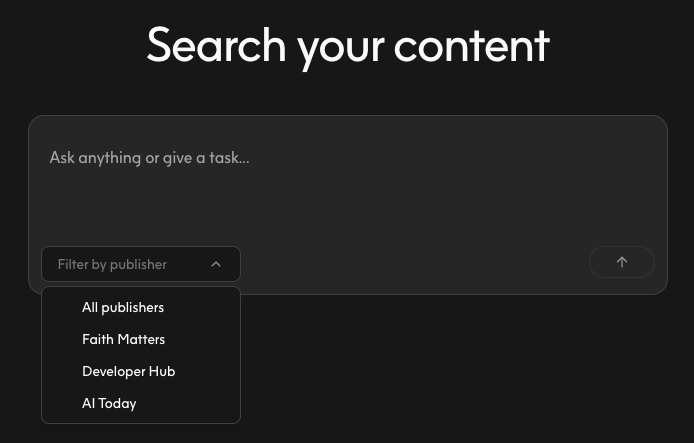
4. Choose a content library from the **Publisher** dropdown
5. Enter a search query in the text input
6. Press **Enter** or click **Search** to see results
Only Publishers where you have access will appear in the dropdown. If no Publishers are visible, verify that content has been uploaded to your organization.
 ## Understanding Search Results
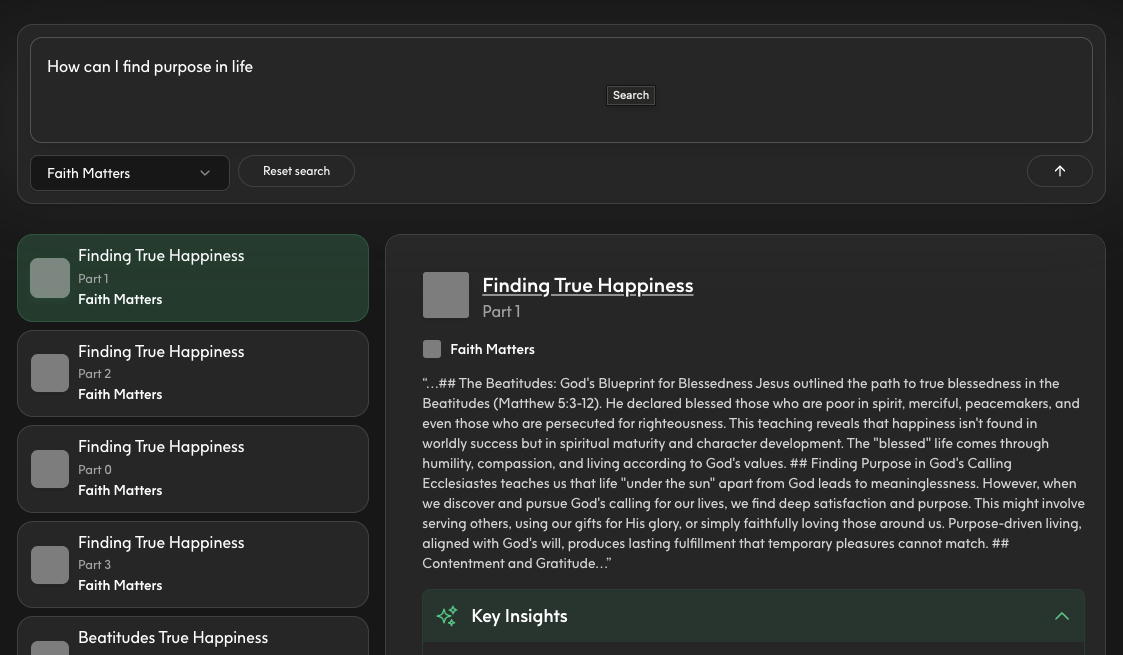
Search results display as cards, each containing:
**Title:** The content item's headline or name
**Part Number:** Sequential identifier for multi-part content (e.g., chapters, episodes)
**Source:** The publisher or origin of the content
**Snippet:** A preview of relevant text from the content
Results are ranked by semantic relevance, not keyword matching. The most contextually relevant content appears first, even if it doesn't contain your exact search terms.
Semantic search understands meaning and context. A search for "dealing with anxiety" might return content about "managing stress" or "finding peace" because they're semantically related.
## Understanding Search Results
Search results display as cards, each containing:
**Title:** The content item's headline or name
**Part Number:** Sequential identifier for multi-part content (e.g., chapters, episodes)
**Source:** The publisher or origin of the content
**Snippet:** A preview of relevant text from the content
Results are ranked by semantic relevance, not keyword matching. The most contextually relevant content appears first, even if it doesn't contain your exact search terms.
Semantic search understands meaning and context. A search for "dealing with anxiety" might return content about "managing stress" or "finding peace" because they're semantically related.
 ## Exploring Key Insights
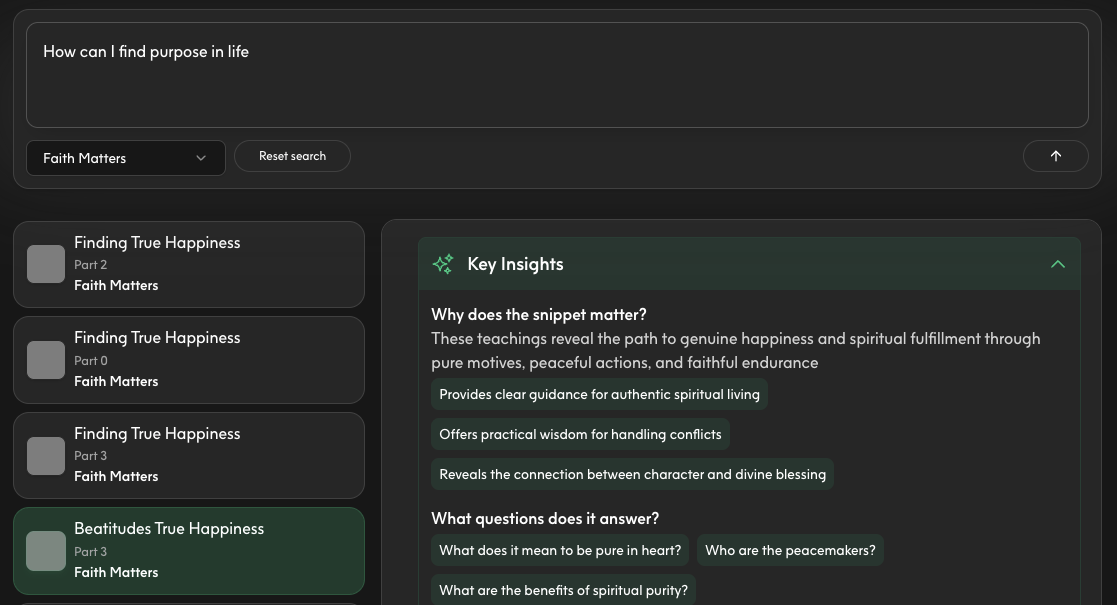
Some search results include expandable Key Insights sections:
1. Look for the **Key Insights** section below search results
2. Click to expand and view AI-generated summaries
3. Review insights to understand common themes across results
Key Insights are automatically generated when available. Not all searches will include insights depending on result quality and content type.
## Exploring Key Insights
Some search results include expandable Key Insights sections:
1. Look for the **Key Insights** section below search results
2. Click to expand and view AI-generated summaries
3. Review insights to understand common themes across results
Key Insights are automatically generated when available. Not all searches will include insights depending on result quality and content type.
 ## Refining Your Search
Get better results with these best practices:
**Use Natural Language**
Write queries as questions or phrases, not just keywords:
* Good: "How can I improve my prayer life?"
* Also Good: "tips for consistent prayer"
* Less Effective: "prayer"
**Be Specific**
Add context to narrow results:
* "marriage advice for newlyweds" instead of "marriage"
* "understanding the book of Romans" instead of "Romans"
**Test Variations**
Try different phrasings to see how semantic search interprets your query:
* "coping with loss" vs. "grief support" vs. "dealing with death"
**Reset and Retry**
Click **Reset** to clear your search and start fresh with a new query.
## Transitioning to API
Once you've tested search queries in the Playground, implement them via the Search API:
**Parameter Mapping:**
| Playground Setting | API Parameter | Example Value |
| ------------------- | ------------------------- | ------------------------------ |
| Publisher selection | `tenant` and `collection` | Organization and publisher IDs |
| Search query | `search` | `"How to pray effectively"` |
| Result count | `limit` | `10` (default) |
Your Playground experiments translate directly to API requests. Use successful queries to guide your production search implementation.
Implement semantic search in your application
Upload and organize content in Studio
Generate credentials for API access
Learn about content ingestion and management
## Understanding Semantic Search
Semantic search differs from traditional keyword search by understanding meaning and context:
**Keyword Search:**
* Matches exact words in your query
* Ranks by word frequency
* Misses synonyms and related concepts
**Semantic Search:**
* Understands intent and meaning
* Ranks by contextual relevance
* Finds related concepts even without exact matches
**Example Comparisons:**
| Query | Keyword Search Finds | Semantic Search Finds |
| ----------------------- | ------------------------------------------- | -------------------------------------------------------------------------------- |
| "finding purpose" | Content with exact phrase "finding purpose" | Also: "discovering your calling", "life meaning", "God's plan for you" |
| "dealing with fear" | Only "fear" mentions | Also: "overcoming anxiety", "courage", "trusting God in uncertainty" |
| "healthy relationships" | Exact match only | Also: "building strong marriages", "biblical friendship", "communication skills" |
Think about what users mean, not just what they say. Semantic search finds content that answers the underlying question, even if the wording differs.
## Frequently Asked Questions
**Why can't I access the Search Playground?**
Search Playground requires a Pro or Enterprise plan with Data Engine access. Pay-as-you-go plans do not include search capabilities. [Upgrade your plan](/studio/billing#upgrading-to-pro) to access this feature.
**Why don't I see any Publishers in the dropdown?**
Publishers only appear after content has been uploaded. Upload content via [Manage Content](/studio/manage-content) or the Content API first, then return to the Search Playground.
**How many results does the Playground return?**
The Playground returns up to 10 results by default. The Search API lets you customize the result limit using the `limit` parameter (up to 100 results per request).
**Why are my results irrelevant?**
Try these troubleshooting steps:
* Make your query more specific with additional context
* Verify your content library contains relevant material
* Test different query phrasings
* Ensure content has been fully processed after upload
**What's the difference between semantic and keyword search?**
Semantic search understands meaning and context, finding conceptually related content even without exact word matches. Keyword search only matches specific words. Semantic search provides better results for natural language queries.
**Can I filter results by content type?**
The Playground shows all results from the selected Publisher. Use the Search API to implement custom filtering by content type, date, author, or other metadata in your application.
**How do I use search results for RAG (Retrieval Augmented Generation)?**
Search results include text snippets perfect for RAG implementations. The snippets preview the exact content you'll receive via the API, which you can pass to the Completions API as context for generating answers.
## Refining Your Search
Get better results with these best practices:
**Use Natural Language**
Write queries as questions or phrases, not just keywords:
* Good: "How can I improve my prayer life?"
* Also Good: "tips for consistent prayer"
* Less Effective: "prayer"
**Be Specific**
Add context to narrow results:
* "marriage advice for newlyweds" instead of "marriage"
* "understanding the book of Romans" instead of "Romans"
**Test Variations**
Try different phrasings to see how semantic search interprets your query:
* "coping with loss" vs. "grief support" vs. "dealing with death"
**Reset and Retry**
Click **Reset** to clear your search and start fresh with a new query.
## Transitioning to API
Once you've tested search queries in the Playground, implement them via the Search API:
**Parameter Mapping:**
| Playground Setting | API Parameter | Example Value |
| ------------------- | ------------------------- | ------------------------------ |
| Publisher selection | `tenant` and `collection` | Organization and publisher IDs |
| Search query | `search` | `"How to pray effectively"` |
| Result count | `limit` | `10` (default) |
Your Playground experiments translate directly to API requests. Use successful queries to guide your production search implementation.
Implement semantic search in your application
Upload and organize content in Studio
Generate credentials for API access
Learn about content ingestion and management
## Understanding Semantic Search
Semantic search differs from traditional keyword search by understanding meaning and context:
**Keyword Search:**
* Matches exact words in your query
* Ranks by word frequency
* Misses synonyms and related concepts
**Semantic Search:**
* Understands intent and meaning
* Ranks by contextual relevance
* Finds related concepts even without exact matches
**Example Comparisons:**
| Query | Keyword Search Finds | Semantic Search Finds |
| ----------------------- | ------------------------------------------- | -------------------------------------------------------------------------------- |
| "finding purpose" | Content with exact phrase "finding purpose" | Also: "discovering your calling", "life meaning", "God's plan for you" |
| "dealing with fear" | Only "fear" mentions | Also: "overcoming anxiety", "courage", "trusting God in uncertainty" |
| "healthy relationships" | Exact match only | Also: "building strong marriages", "biblical friendship", "communication skills" |
Think about what users mean, not just what they say. Semantic search finds content that answers the underlying question, even if the wording differs.
## Frequently Asked Questions
**Why can't I access the Search Playground?**
Search Playground requires a Pro or Enterprise plan with Data Engine access. Pay-as-you-go plans do not include search capabilities. [Upgrade your plan](/studio/billing#upgrading-to-pro) to access this feature.
**Why don't I see any Publishers in the dropdown?**
Publishers only appear after content has been uploaded. Upload content via [Manage Content](/studio/manage-content) or the Content API first, then return to the Search Playground.
**How many results does the Playground return?**
The Playground returns up to 10 results by default. The Search API lets you customize the result limit using the `limit` parameter (up to 100 results per request).
**Why are my results irrelevant?**
Try these troubleshooting steps:
* Make your query more specific with additional context
* Verify your content library contains relevant material
* Test different query phrasings
* Ensure content has been fully processed after upload
**What's the difference between semantic and keyword search?**
Semantic search understands meaning and context, finding conceptually related content even without exact word matches. Keyword search only matches specific words. Semantic search provides better results for natural language queries.
**Can I filter results by content type?**
The Playground shows all results from the selected Publisher. Use the Search API to implement custom filtering by content type, date, author, or other metadata in your application.
**How do I use search results for RAG (Retrieval Augmented Generation)?**
Search results include text snippets perfect for RAG implementations. The snippets preview the exact content you'll receive via the API, which you can pass to the Completions API as context for generating answers.