> ## Documentation Index
> Fetch the complete documentation index at: https://docs.gloo.com/llms.txt
> Use this file to discover all available pages before exploring further.
# AI-Assisted Development
> Using AI coding assistants to quickly build applications with Gloo AI.
These days, developers and non-developers are building apps using AI coding assistants like Claude Code, Codex, Lovable, Base44, Antigravity, and Replit Agent. The development flow at times can be described as "vibe coding" which is a term Andrej Karpathy coined in early 2025. Vibe coding is attractive for various reasons:
* You can prototype, iterate and create full-stack applications in minutes instead of hours, days, or even weeks.
* You don't need deep expertise on UI/UX, databases, APIs, and so on.
* You can focus on what you want your app to do rather than integration details.
Technical expertise is very helpful when you run into errors or need to scale your application for production environments. The right prompting techniques can help you avoid many common pitfalls.
This tutorial teaches you how to use these tools to build apps with Gloo AI. You'll craft effective prompts and learn best practices for building production-ready apps.
## Prerequisites
Before starting, ensure you have:
* A Gloo AI Studio account
* Your Client ID and Client Secret from the [API Credentials page](/studio/manage-api-credentials)
* Access to an AI coding assistant (Bolt.new, Lovable, Replit Agent, Claude Code, Codex, etc.)
* Basic understanding of web applications (frontend + backend)
> **Note:** If you prefer to code manually, start with our [Authentication Tutorial](/tutorials/authentication) and other hands-on tutorials.
***
## How This Tutorial Works
This tutorial is different from traditional code tutorials. Instead of showing you code to copy, we'll show you **prompts** that generate the code for you.
**The process:**
1. Choose your use case (chat app, tool use, etc.)
2. Copy the prompt from this tutorial
3. Paste into your AI coding assistant (Bolt.new, Lovable, Replit Agent, Claude Code, Codex, etc.)
4. Generate the app
5. Test and deploy the generated app
**What makes a good prompt:**
* Clear objective (what you're building)
* Specific architecture (React, Vue, serverless, etc.)
* Complete authentication pattern (OAuth2 with token caching)
* Exact API endpoints and request/response formats
* UI/UX requirements (mobile-responsive, loading states, etc.)
Each example in this tutorial follows this structure, so you can adapt them to your needs.
***
## Step 1: Understanding Prompt Structure
Before we dive into specific examples, let's understand what makes an effective prompt for building Gloo AI applications.
Every effective prompt has five components:
### 1. **Clear Objective**
Start with a single sentence describing what you're building.
* ❌ Bad: "Make a chat thing"
* ✅ Good: "Build a chat application that connects to Gloo AI with streaming responses"
### 2. **Architecture Requirements**
Specify your tech stack so the AI generates appropriate code.
* Frontend: React, Vue, Next.js, vanilla JavaScript
* Backend: Node.js/Express, serverless functions, backend functions, Python/Flask
* Important: Always separate frontend and backend for secure authentication
### 3. **Authentication Flow**
Always include instructions to ensure OAuth2 authentication is implemented securely. The key? Never expose credentials in frontend code. The figure below shows the flow for a properly authenticated Gloo AI API call.

 Every prompt you create must include instructions to ensure this, for example:
```
Use OAuth2 client credentials flow for authentication:
1. Backend exchanges client_id + client_secret for access_token via
POST https://platform.ai.gloo.com/oauth2/token
Content-Type: application/x-www-form-urlencoded
Body: grant_type=client_credentials&scope=api/access
Auth: Basic {base64(client_id:client_secret)}
2. Cache the token for 1 hour in memory/Redis
3. Use Authorization: Bearer {access_token} for all API calls
4. Auto-refresh on 401 errors
5. NEVER expose client_secret to frontend
```
### 4. **API Interaction Details**
Be specific about:
* What the frontend sends to your backend
* What your backend sends to Gloo AI (exact endpoint, headers, body)
* What your backend returns to the frontend
### 5. **UI/UX Requirements**
Describe the user experience:
* Visual layout (chat bubbles, forms, cards)
* Interactive elements (buttons, inputs, dropdowns)
* Feedback mechanisms (loading states, errors, success messages)
* Responsive design needs
**Practice:** Before using the examples below, try writing a one-sentence objective for an app you want to build. This helps you choose the right example to start from.
***
## Step 2: Choose Your Starting Point
Select an example prompt from the three examples in this section. We've prepared these tested prompts for common use cases. Start with Example 1 (Chat Application) if you're new to this approach. Each example includes:
* When to use this pattern
* Which platforms we've tested on
* The complete prompt ready to copy
### Example 1: Chat Application (with Streaming Support)
**What you'll get:** A chat app with real-time, typewriter-style AI responses
**When to use this:**
* Want immediate feedback as AI generates responses
* Need to handle long responses gracefully
* Want users to see progress in real-time
**Key concept:** Streaming shows response chunks as they're generated instead of waiting for the complete response.
**Tested on:** Antigravity, Bolt.new, Claude Code, Codex, Lovable, Replit Agent, v0.dev
**The Prompt:**
Copy the entire prompt below and enter it into your coding assistant of choice:
````markdown theme={null}
# Gloo AI Streaming Chat
Build a chat app with real-time streaming responses from Gloo AI.
OAuth2 authentication in backend; frontend receives SSE stream.
**Auth:**
Use OAuth2 client credentials flow for authentication:
1. Backend exchanges client_id + client_secret for access_token via
POST https://platform.ai.gloo.com/oauth2/token
Content-Type: application/x-www-form-urlencoded
Body: grant_type=client_credentials&scope=api/access
Auth: Basic {base64(client_id:client_secret)}
2. Cache the token for 1 hour
3. Use Authorization: Bearer {access_token} for all API calls
4. Auto-refresh token on 401 errors
5. NEVER expose client_secret to frontend
**Streaming flow:**
Frontend initiates:
POST /api/chat/stream
Body: { "message": "..."}
Backend calls Gloo with streaming:
POST https://platform.ai.gloo.com/ai/v2/chat/completions
Authorization: Bearer {access_token}
Content-Type: application/json
Body:
```json
{
"messages": [
{
"role": "user",
"content": "User's message"
}
],
"auto_routing": true,
"stream": true
}
```
Backend forwards SSE to frontend:
- Parse Gloo's streaming response chunks
- Forward as Server-Sent Events
- Accumulate full message
- Send suggestions at end
**UI Requirements:**
- Typewriter effect for AI responses
- Cancel stream button
- Smooth markdown rendering as chunks arrive
- Show typing indicator
````
All five components of creating an effective prompt are shown in the prompt:
| Component | Where in Prompt | Example Text |
| -------------------------------- | -------------------------- | -------------------------------------------------------------------------------------------------------------------------------------------------------------------------- |
| **1. Clear Objective** | First sentence | "Build a chat app with real-time streaming responses from Gloo AI." |
| **2. Architecture Requirements** | Second sentence | "OAuth2 authentication in backend; frontend receives SSE stream." |
| **3. Authentication Flow** | "Auth:" section | "Use OAuth2 client credentials flow for authentication:
Every prompt you create must include instructions to ensure this, for example:
```
Use OAuth2 client credentials flow for authentication:
1. Backend exchanges client_id + client_secret for access_token via
POST https://platform.ai.gloo.com/oauth2/token
Content-Type: application/x-www-form-urlencoded
Body: grant_type=client_credentials&scope=api/access
Auth: Basic {base64(client_id:client_secret)}
2. Cache the token for 1 hour in memory/Redis
3. Use Authorization: Bearer {access_token} for all API calls
4. Auto-refresh on 401 errors
5. NEVER expose client_secret to frontend
```
### 4. **API Interaction Details**
Be specific about:
* What the frontend sends to your backend
* What your backend sends to Gloo AI (exact endpoint, headers, body)
* What your backend returns to the frontend
### 5. **UI/UX Requirements**
Describe the user experience:
* Visual layout (chat bubbles, forms, cards)
* Interactive elements (buttons, inputs, dropdowns)
* Feedback mechanisms (loading states, errors, success messages)
* Responsive design needs
**Practice:** Before using the examples below, try writing a one-sentence objective for an app you want to build. This helps you choose the right example to start from.
***
## Step 2: Choose Your Starting Point
Select an example prompt from the three examples in this section. We've prepared these tested prompts for common use cases. Start with Example 1 (Chat Application) if you're new to this approach. Each example includes:
* When to use this pattern
* Which platforms we've tested on
* The complete prompt ready to copy
### Example 1: Chat Application (with Streaming Support)
**What you'll get:** A chat app with real-time, typewriter-style AI responses
**When to use this:**
* Want immediate feedback as AI generates responses
* Need to handle long responses gracefully
* Want users to see progress in real-time
**Key concept:** Streaming shows response chunks as they're generated instead of waiting for the complete response.
**Tested on:** Antigravity, Bolt.new, Claude Code, Codex, Lovable, Replit Agent, v0.dev
**The Prompt:**
Copy the entire prompt below and enter it into your coding assistant of choice:
````markdown theme={null}
# Gloo AI Streaming Chat
Build a chat app with real-time streaming responses from Gloo AI.
OAuth2 authentication in backend; frontend receives SSE stream.
**Auth:**
Use OAuth2 client credentials flow for authentication:
1. Backend exchanges client_id + client_secret for access_token via
POST https://platform.ai.gloo.com/oauth2/token
Content-Type: application/x-www-form-urlencoded
Body: grant_type=client_credentials&scope=api/access
Auth: Basic {base64(client_id:client_secret)}
2. Cache the token for 1 hour
3. Use Authorization: Bearer {access_token} for all API calls
4. Auto-refresh token on 401 errors
5. NEVER expose client_secret to frontend
**Streaming flow:**
Frontend initiates:
POST /api/chat/stream
Body: { "message": "..."}
Backend calls Gloo with streaming:
POST https://platform.ai.gloo.com/ai/v2/chat/completions
Authorization: Bearer {access_token}
Content-Type: application/json
Body:
```json
{
"messages": [
{
"role": "user",
"content": "User's message"
}
],
"auto_routing": true,
"stream": true
}
```
Backend forwards SSE to frontend:
- Parse Gloo's streaming response chunks
- Forward as Server-Sent Events
- Accumulate full message
- Send suggestions at end
**UI Requirements:**
- Typewriter effect for AI responses
- Cancel stream button
- Smooth markdown rendering as chunks arrive
- Show typing indicator
````
All five components of creating an effective prompt are shown in the prompt:
| Component | Where in Prompt | Example Text |
| -------------------------------- | -------------------------- | -------------------------------------------------------------------------------------------------------------------------------------------------------------------------- |
| **1. Clear Objective** | First sentence | "Build a chat app with real-time streaming responses from Gloo AI." |
| **2. Architecture Requirements** | Second sentence | "OAuth2 authentication in backend; frontend receives SSE stream." |
| **3. Authentication Flow** | "Auth:" section | "Use OAuth2 client credentials flow for authentication:
1. Backend exchanges client\_id + client\_secret..." |
| **4. API Interaction Details** | "Streaming flow:" section | Frontend initiates:
`POST /api/chat/stream`
Backend calls Gloo AI:
`POST https://.../ai/v2/chat/completions`
Backend forwards SSE chunks to frontend |
| **5. UI/UX Requirements** | "UI Requirements:" section | "- Typewriter effect for AI responses..." |
Notice how each component is clearly separated and specific. The AI coding assistant knows exactly what to build, how to structure it, how to authenticate, which APIs to call, and what the UI should look like.
***
### Example 2: Completions with Tool Use
**What you'll get:** An application that returns structured, predictable JSON responses.
**When to use this:**
* You need consistent data formats (not free-form text)
* Building forms, assessments, or data extraction tools
* Need machine-readable output for downstream processing
* Want type-safe responses with validation
**Key concept:** Tool use forces the AI to follow a JSON schema you define, perfect for applications that need predictable outputs.
**Tested on:** Antigravity, Bolt.new, Claude Code, Codex, Lovable
**Example Use Cases:**
* Personal growth plans
* Recipe generation with structured ingredients
* Data extraction from text into structured format
The prompt example shows a goal-setting assistant that provides a structured growth plan based on a user's goal.
**The Prompt:**
```markdown theme={null}
# Gloo AI Goal-Setting Assistant
Build a goal-setting assistant that takes a user’s goal and returns a
structured growth plan with actionable steps and timelines. Use Gloo
AI's completions with tool use feature to get structured, predictable
JSON responses.
**Auth:**
Use OAuth2 client credentials flow for authentication:
1. Backend exchanges client_id + client_secret for access_token via
POST https://platform.ai.gloo.com/oauth2/token
Content-Type: application/x-www-form-urlencoded
Body: grant_type=client_credentials&scope=api/access
Auth: Basic {base64(client_id:client_secret)}
2. Cache the token for 1 hour
3. Use Authorization: Bearer {access_token} for all API calls
4. Auto-refresh token on 401 errors
5. NEVER expose client_secret to frontend
**API flow:**
Frontend sends:
{
"goal": "User's goal or question",
"toolType": "growth_plan" // or other structured output types
}
Backend calls Gloo with tool definition:
POST https://platform.ai.gloo.com/ai/v2/chat/completions
Authorization: Bearer {access_token}
Content-Type: application/json
Body:
{
"auto_routing": true,
"messages": [
{
"role": "system",
"content": "You are a helpful assistant that creates personalized growth plans."
},
{
"role": "user",
"content": "I want to grow in my faith"
}
],
"tools": [
{
"type": "function",
"function": {
"name": "create_growth_plan",
"description": "Generate a structured personal growth plan",
"parameters": {
"type": "object",
"properties": {
"title": {
"type": "string",
"description": "A clear, inspiring title for the growth plan"
},
"areas": {
"type": "array",
"items": {
"type": "object",
"properties": {
"area": {
"type": "string",
"description": "Specific area of growth"
},
"actions": {
"type": "array",
"items": {
"type": "string"
},
"description": "Concrete action steps"
}
},
"required": ["area", "actions"]
},
"description": "Different areas of growth with specific actions"
},
"timeline": {
"type": "string",
"description": "Suggested timeline for the plan"
}
},
"required": ["title", "areas", "timeline"]
}
}
}
],
"tool_choice": "required" // Force AI to use the tool
}
Response structure:
{
"id": "chatcmpl-abc123",
"choices": [
{
"finish_reason": "tool_calls",
"index": 0,
"message": {
"content": null,
"role": "assistant",
"tool_calls": [
{
"id": "call_xyz789",
"type": "function",
"function": {
"name": "create_growth_plan",
"arguments": "{\"title\":\"Faith Growth Journey\",\"areas\":[{\"area\":\"Daily Prayer\",\"actions\":[\"Set aside 15 minutes each morning\",\"Use a prayer journal\"]},{\"area\":\"Scripture Study\",\"actions\":[\"Read one chapter daily\",\"Join a Bible study group\"]}],\"timeline\":\"30 days\"}"
}
}
]
}
}
],
"created": 1755118870,
"model": "gloo-anthropic-claude-sonnet-4.5",
"object": "chat.completion",
"usage": {
"completion_tokens": 391,
"prompt_tokens": 1631,
"total_tokens": 2022
}
}
Backend parses and returns to frontend:
{
"title": "Faith Growth Journey",
"areas": [
{
"area": "Daily Prayer",
"actions": [
"Set aside 15 minutes each morning",
"Use a prayer journal"
]
},
{
"area": "Scripture Study",
"actions": [
"Read one chapter daily",
"Join a Bible study group"
]
}
],
"timeline": "30 days"
}
**UI Requirements:**
- Input form for user's goal/question
- Display structured output in formatted cards/sections
- Show loading state during API call
- Handle and display schema validation errors
- Option to regenerate with different parameters
- Export structured data as JSON or CSV
```
Try spotting where the 5 components to crafting a good prompt can be found in the prompt above. **Hint**: Look at Example 1's breakdown.
### Example 3: Building AI Overviews
**What you'll get:** An AI Overview feature that retrieves relevant snippets and generates a grounded answer with inline citations.
This example uses item recommendations functionality that requires you to have a Pro or Enterprise plan as well as content uploaded to your content library.
**When to use this:**
* You want a search-first experience with synthesized answers
* You need source-aware responses with explicit citation mapping
* You want a UI pattern similar to AI overview cards
**Key concept:** Retrieve relevant snippets first, then ground a Completions v2 response only in those sources.
**Tested on:** Antigravity, Bolt.new, Claude Code, Codex, Lovable, Replit Agent
**The Prompt:**
````markdown theme={null}
# Gloo AI Overview
Build an AI Overview feature that takes a user's search query, retrieves relevant faith-based content snippets, and generates a synthesized AI answer with inline source citations.
- Frontend (ex: React)
- Backend (ex: serverless functions or Node.js/Express)
**Auth:**
Use OAuth2 client credentials flow for authentication:
1. Backend exchanges client_id + client_secret for access_token via
POST https://platform.ai.gloo.com/oauth2/token
Content-Type: application/x-www-form-urlencoded
Body: grant_type=client_credentials&scope=api/access
Auth: Basic {base64(client_id:client_secret)}
2. Cache the token for 1 hour
3. Use Authorization: Bearer {access_token} for all API calls
4. Auto-refresh token on 401 errors
5. NEVER expose client_secret to frontend
**API flow:**
Frontend sends:
```json
{
"query": "What is my purpose in life?"
}
```
Step 1 — Backend fetches relevant sources from Gloo:
```
POST https://platform.ai.gloo.com/ai/v1/data/items/recommendations/verbose
Authorization: Bearer {access_token}
Content-Type: application/json
Body:
{
"query": "What is my purpose in life?",
"collection": "GlooProd",
"tenant": "{your_tenant}",
"publishers": ["{your_publisher}"],
"max_snippet_count_overall": 5,
"certainty_threshold": 0.5
}
Response structure:
[
{
"item_id": "...",
"item_title": "Finding True Happiness",
"item_url": "",
"uuids": [
{
"uuid": "...",
"snippet": "# Finding True Happiness...",
"certainty": 0.703
}
]
}
]
Note: item_url may be empty or contain a link.
```
From the response, extract up to 5 sources. For each source, capture:
- item_title — used for citation tooltip
- item_url — used for citation link
- The first snippet from uuids[] — used as context for the AI
Step 2 — Backend generates a grounded AI answer:
```
POST https://platform.ai.gloo.com/ai/v2/chat/completions
Authorization: Bearer {access_token}
Content-Type: application/json
Body:
{
"messages": [
{
"role": "system",
"content": "You are a helpful assistant. Answer the user's question using ONLY the provided sources. Insert a citation marker like [1], [2], etc. inline immediately after each sentence or claim that draws from a source. Use only the sources given. Be concise."
},
{
"role": "user",
"content": "Sources:\\n[1] {item_title_1}: {snippet_1}\\n[2] {item_title_2}: {snippet_2}\\n...\\n\\nQuestion: {query}"
}
],
"auto_routing": true
}
```
Backend returns to frontend:
```json
{
"answer": "The key to happiness, from a Christian perspective, is found in a relationship with God. [1] God's grace is unconditional. [2] This lasting joy is rooted in understanding one's identity as a beloved child of God. [3]",
"sources": [
{
"index": 1,
"title": "Finding True Happiness",
"url": "https://..."
},
{
"index": 2,
"title": "God's Unconditional Grace",
"url": "https://..."
},
{
"index": 3,
"title": "Finding Joy",
"url": "https://..."
}
]
}
```
**UI Requirements:**
- Display a search bar at the top with a clear (×) and submit button
- Below the search bar, show an AI Overview card with:
- A header row with a star/sparkle icon, the label "AI Overview"
- Render the answer text with each [N] marker replaced by a URL link icon
- Each link icon should be hoverable — on hover, show a tooltip with the source title and a link to url
- Show a loading skeleton while waiting for the response
- Display a disclaimer below the answer: "AI-generated answer. Please verify critical facts."
- Show an error banner if either API call fails
````
***
## Step 3: Generate Your Application
After copying a prompt to your AI coding assistant, follow these steps:
### 1. Set Up Your Gloo AI Credentials
* Enter your Gloo AI credentials if prompted during code generation. This typically applies to coding assistants that generate code online such as Lovable and Replit Agent.
* Enter your credentials as instructed after code generation. This typically applies to assistants that create code locally such as Claude Code and Codex.
Get your credentials from [Gloo AI Studio](https://studio.ai.gloo.com/) > API Credentials.
### 2. Enter Your Publisher and Tenant (Example 3 Only)
If you're using Example 3 (Building AI Overviews), you'll need to provide two additional values before your app will work:
* **Publisher** — name of your publisher
* **Tenant** — tenant identifier
These values are used in the recommendations API call.
Find these values in [Gloo AI Studio](https://studio.ai.gloo.com/):
1. Navigate to the “Manage Organizations” page.
2. In your organization’s row, click on “View Publishers”.
3. Note the publisher name.
4. The tenant identifier is derived from the publisher name by removing any spaces. For example, if your publisher name is "Faith Matters," the tenant identifier would be "FaithMatters."
Enter the two values as environment variables or when prompted by your AI coding assistant.
### 3. Review the Generated Code
* Check that OAuth2 authentication is in the backend only
* Verify environment variables are properly configured
* Ensure error handling is present for 401, 429, 500 errors
* Confirm token caching is implemented
### 4. Start the Application
Online coding tools will automatically start your app in a Preview tab.
For locally generated code:
* Follow instructions (typically in a README) to install dependencies
* Start the backend and frontend servers
***
## Step 4: Test Your Application
Once your app is running, check that it's working well.
### Example 1: Chat Application (with Streaming Support)
Enter a message and ensure the results are streamed in. You should see something like this:
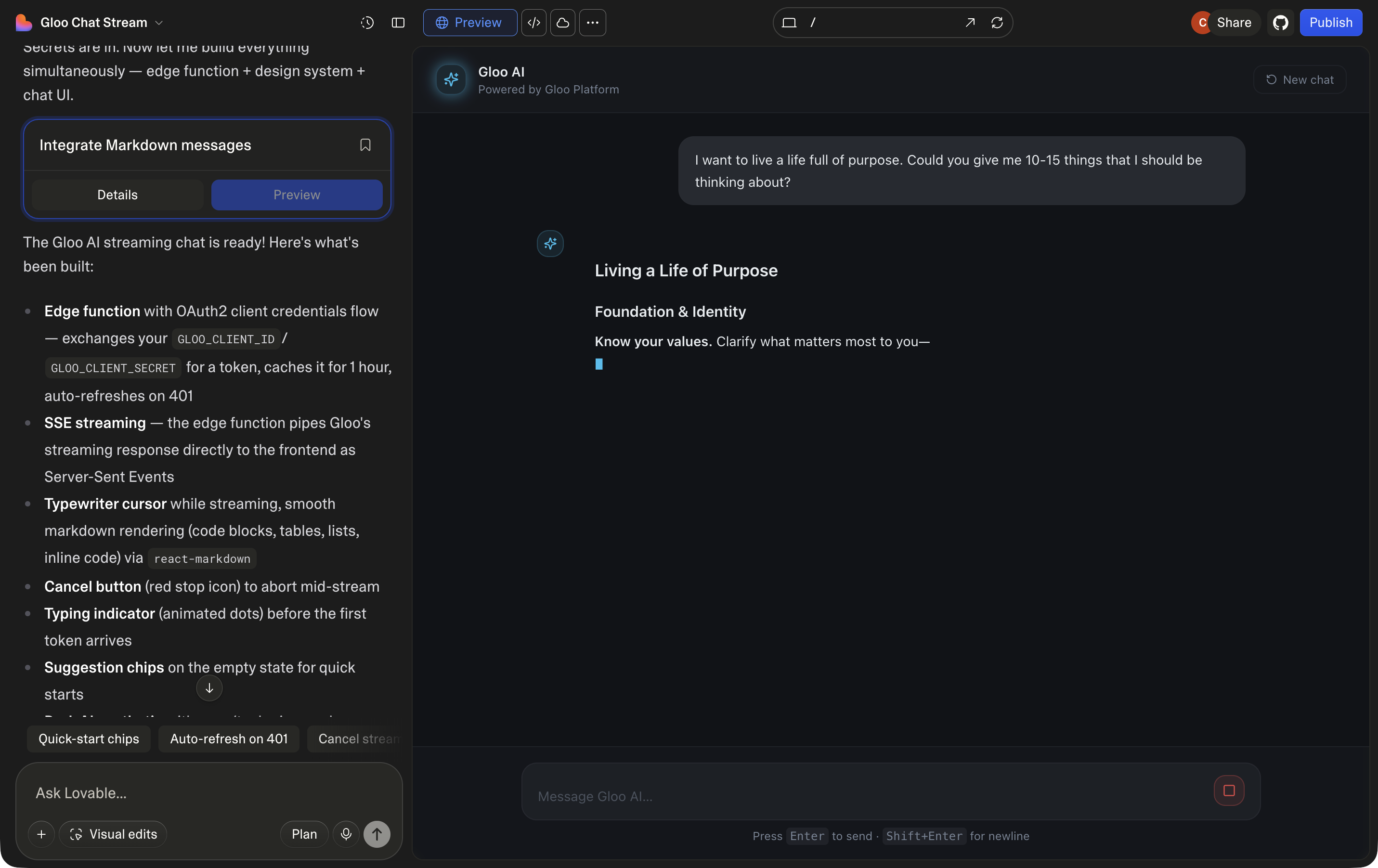
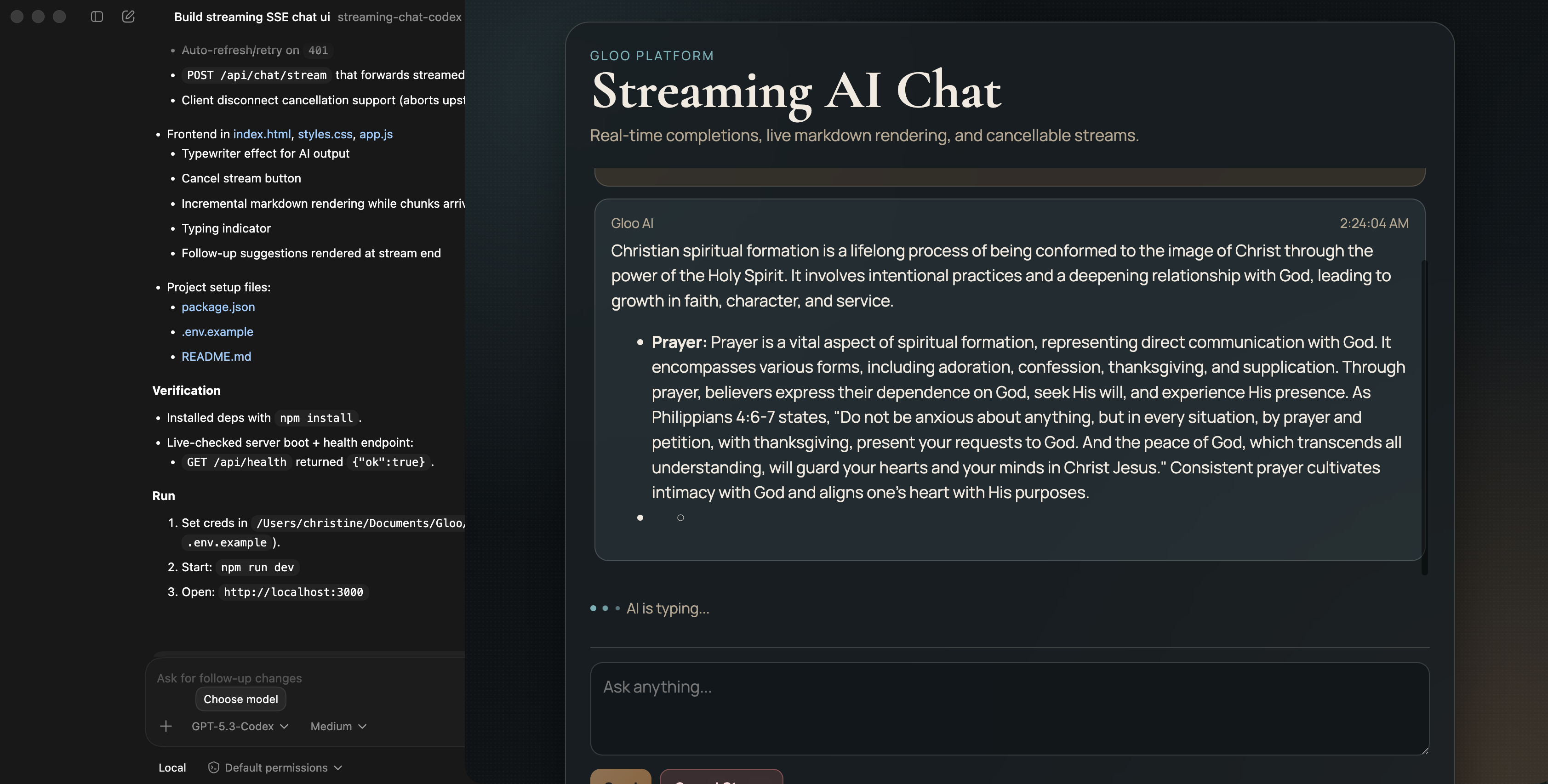 Because these coding models are generative, the app UI will vary with each run — even using identical prompts. However, the overall functionality should consistently match your specifications.
### Example 2: Completions with Tool Use
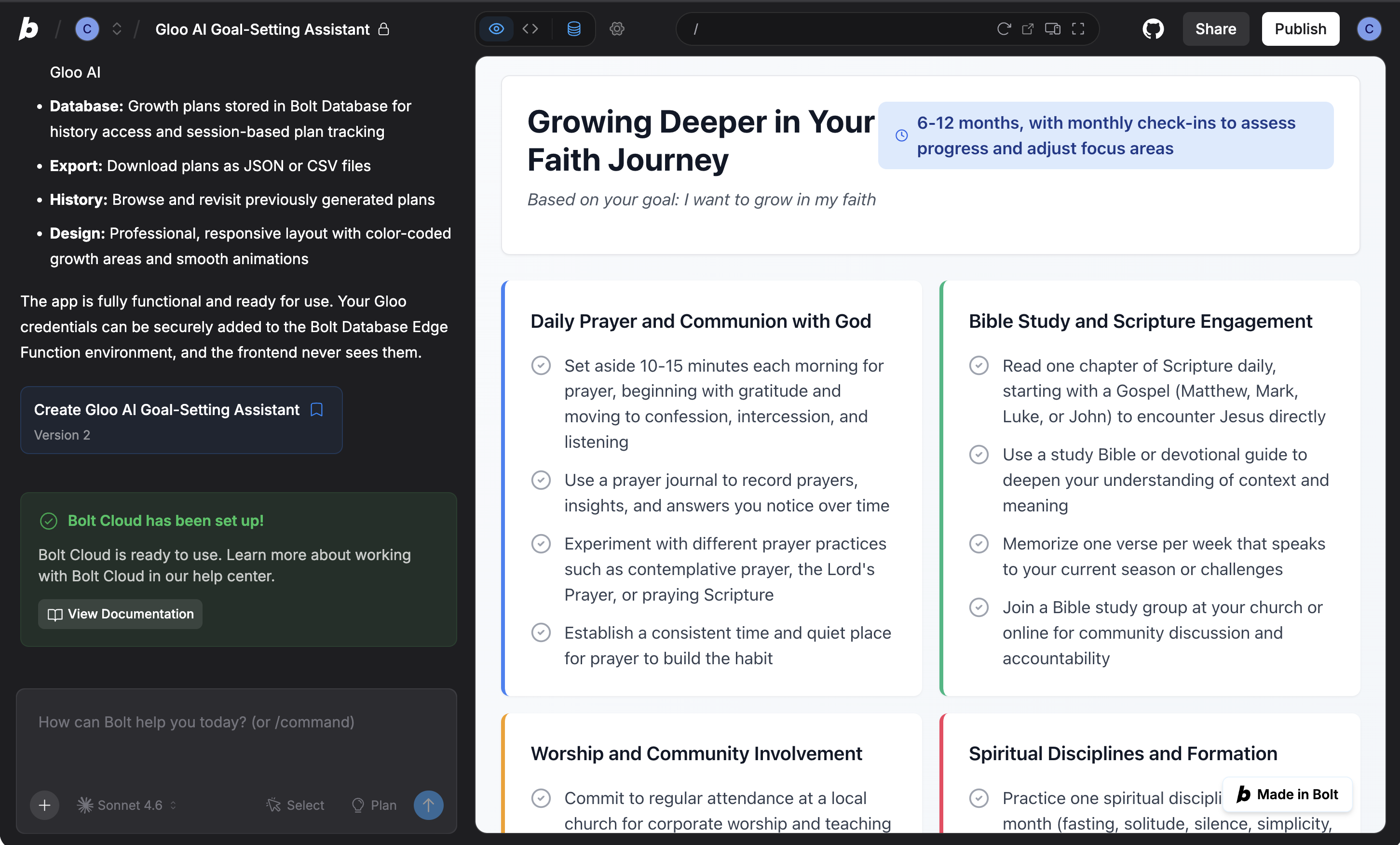
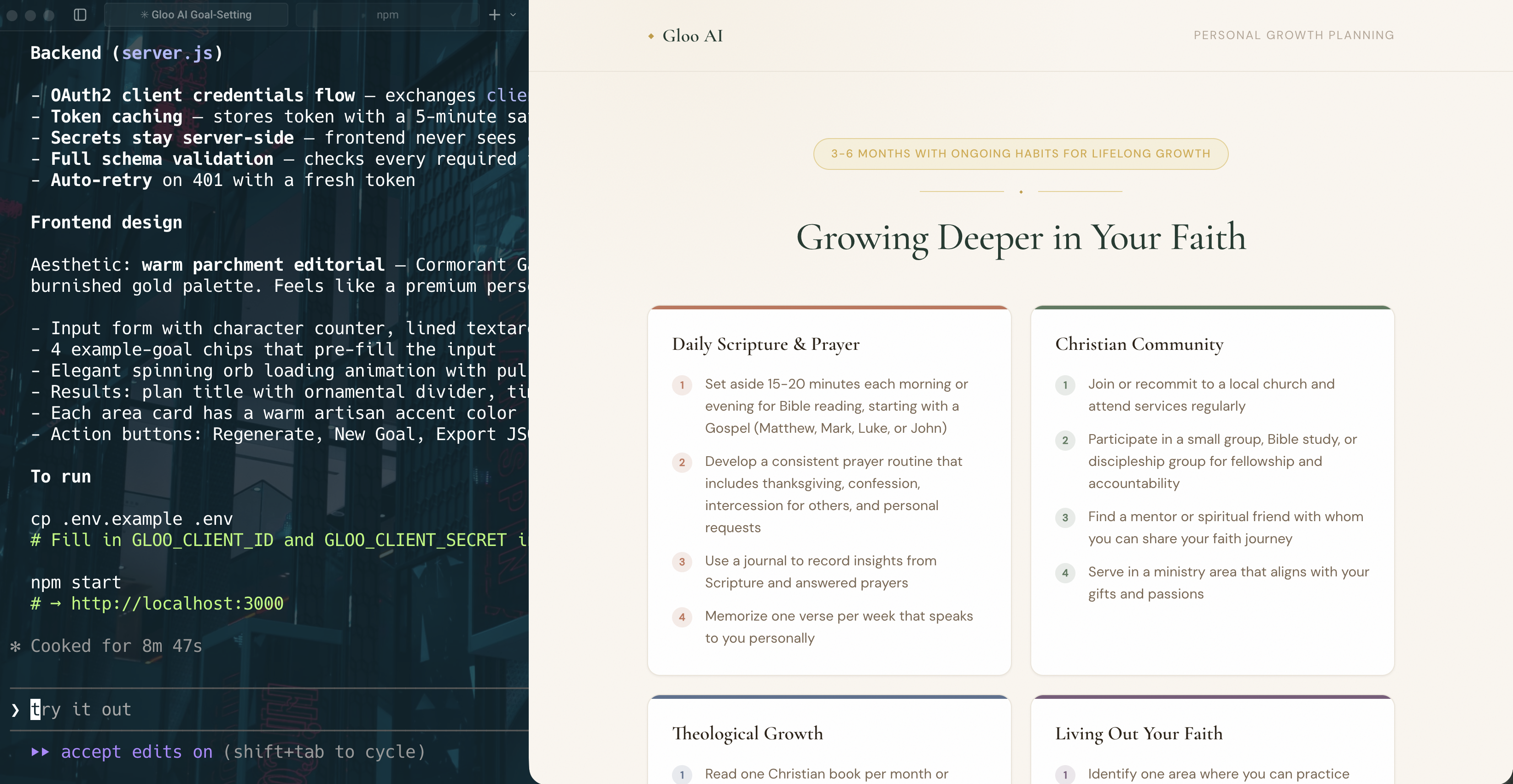
Enter a test goal, for example "I want to grow in faith". You should see something similar to the following:
Because these coding models are generative, the app UI will vary with each run — even using identical prompts. However, the overall functionality should consistently match your specifications.
### Example 2: Completions with Tool Use
Enter a test goal, for example "I want to grow in faith". You should see something similar to the following:
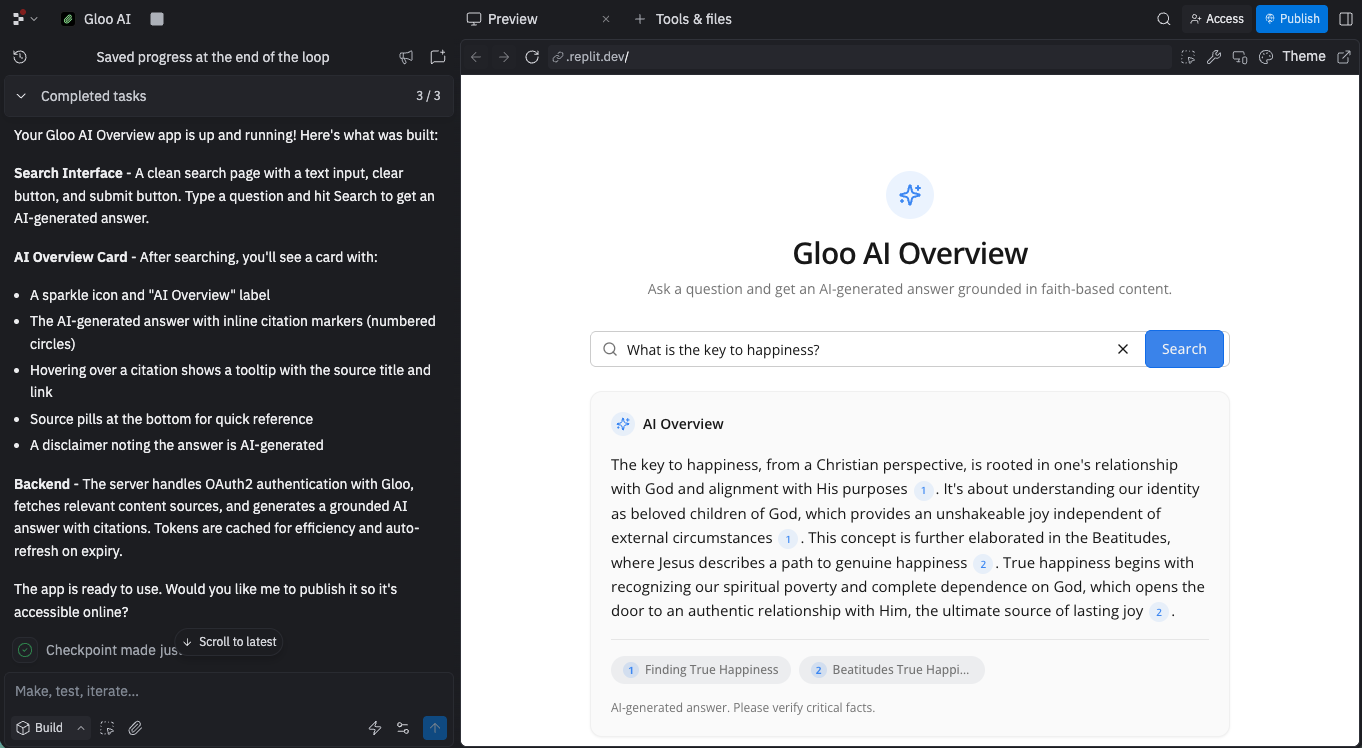
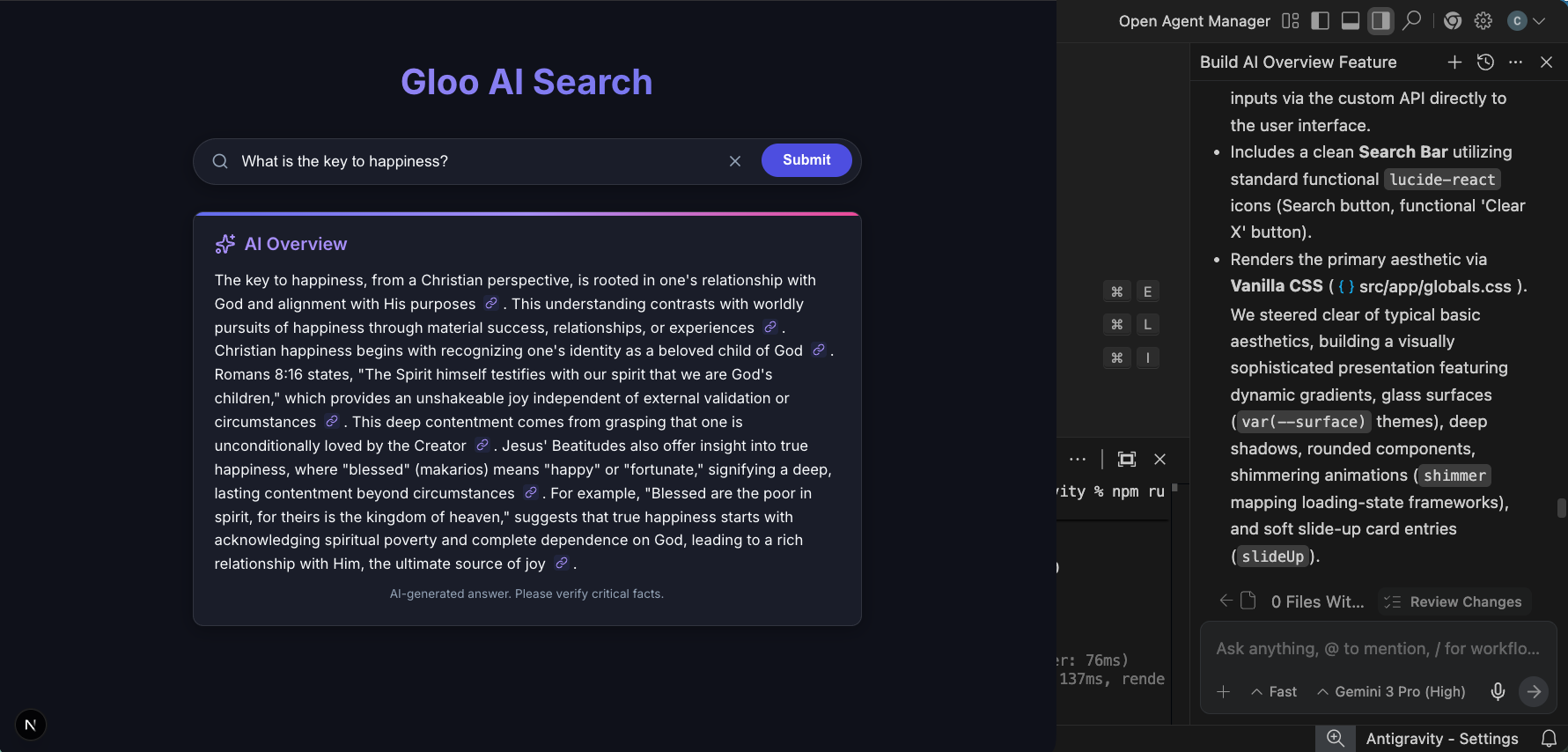
 ### Example 3: Building AI Overviews
Enter a search query (for example, "What is my purpose in life?"). Verify that:
* The UI shows a loading skeleton while waiting
* The answer includes inline citation markers rendered as link icons
* Hovering each link icon shows the source title and link
You should see something similar to the following:
### Example 3: Building AI Overviews
Enter a search query (for example, "What is my purpose in life?"). Verify that:
* The UI shows a loading skeleton while waiting
* The answer includes inline citation markers rendered as link icons
* Hovering each link icon shows the source title and link
You should see something similar to the following:
 ### Iterate if Needed
If something isn't right, use follow-up prompts:
* "Add error handling for network timeouts"
* "Make the UI mobile-responsive"
* "Add a loading skeleton instead of a spinner"
* "Change the color scheme to match our brand"
***
## Step 5: Understanding Advanced Patterns
As you build more complex applications, you'll want to understand these patterns. You can ask your AI coding assistant to implement these by adding them to your prompts. You can also use them in a follow-up prompt.
### Pattern 1: Token Caching
```markdown theme={null}
Implement robust token caching:
- Store access_token with expiration timestamp (issued_at + expires_in)
- Check expiration before each API call
- Refresh proactively (55 minutes vs 60-minute expiry)
- Handle race conditions in serverless (use atomic operations or locks)
- Log token refreshes for monitoring
- Store tokens in memory (single instance) or Redis (distributed)
```
**Short version:** "Implement token caching with 1-hour expiration and 5-minute refresh buffer"
***
### Pattern 2: Comprehensive Error Handling
```markdown theme={null}
Implement comprehensive error handling:
401 Unauthorized:
- Token expired or invalid
- Clear cached token
- Fetch new token automatically
- Retry original request
- If still fails, return error to user
429 Rate Limited:
- Implement exponential backoff (1s, 2s, 4s, 8s)
- Show user-friendly message about temporary limit
- Queue requests if possible
- Log rate limit occurrences
500 Server Error:
- Show user-friendly error message
- Log full error details for debugging
- Retry once after 2 seconds
- If retry fails, fail gracefully
Network Errors:
- Retry with exponential backoff
- Set maximum retry attempts (3-5)
- Timeout after 30 seconds
- Show connection error message
```
**Short version:** "Implement comprehensive error handling with automatic retry for 401 and exponential backoff for 429"
***
### Pattern 3: Client-Side Rate Limiting
```markdown theme={null}
Implement client-side rate limiting:
- Track requests per user in Redis or memory
- Implement sliding window (e.g., 100 requests/hour per user)
- Return 429 with retry-after header when limit hit
- Show rate limit status in UI (e.g., "47/100 requests remaining")
- Queue requests when approaching limit
- Allow burst requests with token bucket algorithm
```
**Short version:** "Implement sliding window rate limiting with 100 requests per hour per user"
**Practice:** Try adding one of these patterns to Example 1 (Chat Application) by appending the instruction to the prompt or using it in a follow-up prompt.
***
## Platform-Specific Optimizations
Different AI coding assistants have different strengths. Here are a few pointers to get the best results from each:
### **Base44 / Bolt.new / Lovable / Replit Agent / v0.dev**
* Use assistants like ChatGPT to create a detailed project requirements document (PRD) first. Review and split into phases for implementation.
* Upload screenshots or sketches instead of describing layouts.
* Stick to the tool's default stack to avoid friction.
* Use automatically created checkpoints to revert to a previous version if needed.
* Iterate in small steps rather than requesting complete rewrites.
### **Claude Code / Codex**
* Go into plan mode before coding.
* Break projects into short, reviewable steps or components.
* Review results often, request refinements after each pass.
* Start fresh sessions or limit irrelevant history to reduce confusion.
* Be clear about what "done" means (ex: passing unit tests, zero lint errors, responsive design).
### **Antigravity**
* Define a high-level goal (e.g., "Implement search bar") instead of small tasks.
* Utilize Agent Manager for parallelizing and overseeing tasks.
* Request Artifacts like Screenshots or Browser Recordings for verification.
***
## Troubleshooting
Here are some common issues you may run into with these examples and in general when using AI coding assistants to build with Gloo AI.
* **503 errors when backend calls API**:
* Verify the endpoint being used in the code.
* Provide the coding assistant with links to relevant resources, such as the API reference or related tutorial documentation.
* **500 errors calling completions with tool use**:
* Verify the endpoint being used in the code.
* Verify that the model being used supports tool use.
* Try the API call directly in [the playground](/api-reference/studio/post-completions).
***
## What You've Learned
Congratulations! You now know how to effectively use AI assistants to build with Gloo AI. You learned how to structure effective prompts, properly secure your API calls, then tested these out on some example use cases.
## Next Steps
* Check out the [API documentation](https://docs.gloo.com/api-reference/general/overview) for complete API reference
* Review [other tutorials](https://docs.gloo.com/tutorials/overview) where you can work directly with code.
**Give us feedback**
We would love to hear from you as well:
* Found a better way to structure a prompt? Share it with us.
* Generated an innovative application? We'd love to see it.
This is a new way to learn. Please let us know:
* Which prompts worked best for you?
* Which AI coding assistant you prefer?
* What examples you'd like to see added?
### Iterate if Needed
If something isn't right, use follow-up prompts:
* "Add error handling for network timeouts"
* "Make the UI mobile-responsive"
* "Add a loading skeleton instead of a spinner"
* "Change the color scheme to match our brand"
***
## Step 5: Understanding Advanced Patterns
As you build more complex applications, you'll want to understand these patterns. You can ask your AI coding assistant to implement these by adding them to your prompts. You can also use them in a follow-up prompt.
### Pattern 1: Token Caching
```markdown theme={null}
Implement robust token caching:
- Store access_token with expiration timestamp (issued_at + expires_in)
- Check expiration before each API call
- Refresh proactively (55 minutes vs 60-minute expiry)
- Handle race conditions in serverless (use atomic operations or locks)
- Log token refreshes for monitoring
- Store tokens in memory (single instance) or Redis (distributed)
```
**Short version:** "Implement token caching with 1-hour expiration and 5-minute refresh buffer"
***
### Pattern 2: Comprehensive Error Handling
```markdown theme={null}
Implement comprehensive error handling:
401 Unauthorized:
- Token expired or invalid
- Clear cached token
- Fetch new token automatically
- Retry original request
- If still fails, return error to user
429 Rate Limited:
- Implement exponential backoff (1s, 2s, 4s, 8s)
- Show user-friendly message about temporary limit
- Queue requests if possible
- Log rate limit occurrences
500 Server Error:
- Show user-friendly error message
- Log full error details for debugging
- Retry once after 2 seconds
- If retry fails, fail gracefully
Network Errors:
- Retry with exponential backoff
- Set maximum retry attempts (3-5)
- Timeout after 30 seconds
- Show connection error message
```
**Short version:** "Implement comprehensive error handling with automatic retry for 401 and exponential backoff for 429"
***
### Pattern 3: Client-Side Rate Limiting
```markdown theme={null}
Implement client-side rate limiting:
- Track requests per user in Redis or memory
- Implement sliding window (e.g., 100 requests/hour per user)
- Return 429 with retry-after header when limit hit
- Show rate limit status in UI (e.g., "47/100 requests remaining")
- Queue requests when approaching limit
- Allow burst requests with token bucket algorithm
```
**Short version:** "Implement sliding window rate limiting with 100 requests per hour per user"
**Practice:** Try adding one of these patterns to Example 1 (Chat Application) by appending the instruction to the prompt or using it in a follow-up prompt.
***
## Platform-Specific Optimizations
Different AI coding assistants have different strengths. Here are a few pointers to get the best results from each:
### **Base44 / Bolt.new / Lovable / Replit Agent / v0.dev**
* Use assistants like ChatGPT to create a detailed project requirements document (PRD) first. Review and split into phases for implementation.
* Upload screenshots or sketches instead of describing layouts.
* Stick to the tool's default stack to avoid friction.
* Use automatically created checkpoints to revert to a previous version if needed.
* Iterate in small steps rather than requesting complete rewrites.
### **Claude Code / Codex**
* Go into plan mode before coding.
* Break projects into short, reviewable steps or components.
* Review results often, request refinements after each pass.
* Start fresh sessions or limit irrelevant history to reduce confusion.
* Be clear about what "done" means (ex: passing unit tests, zero lint errors, responsive design).
### **Antigravity**
* Define a high-level goal (e.g., "Implement search bar") instead of small tasks.
* Utilize Agent Manager for parallelizing and overseeing tasks.
* Request Artifacts like Screenshots or Browser Recordings for verification.
***
## Troubleshooting
Here are some common issues you may run into with these examples and in general when using AI coding assistants to build with Gloo AI.
* **503 errors when backend calls API**:
* Verify the endpoint being used in the code.
* Provide the coding assistant with links to relevant resources, such as the API reference or related tutorial documentation.
* **500 errors calling completions with tool use**:
* Verify the endpoint being used in the code.
* Verify that the model being used supports tool use.
* Try the API call directly in [the playground](/api-reference/studio/post-completions).
***
## What You've Learned
Congratulations! You now know how to effectively use AI assistants to build with Gloo AI. You learned how to structure effective prompts, properly secure your API calls, then tested these out on some example use cases.
## Next Steps
* Check out the [API documentation](https://docs.gloo.com/api-reference/general/overview) for complete API reference
* Review [other tutorials](https://docs.gloo.com/tutorials/overview) where you can work directly with code.
**Give us feedback**
We would love to hear from you as well:
* Found a better way to structure a prompt? Share it with us.
* Generated an innovative application? We'd love to see it.
This is a new way to learn. Please let us know:
* Which prompts worked best for you?
* Which AI coding assistant you prefer?
* What examples you'd like to see added?