
This tutorial shows you how to build custom search functionality using the Gloo AI Search API. You’ll learn to authenticate, perform semantic search, work with rich results, and optionally combine search with Completions V2 for Retrieval Augmented Generation (RAG). The Search API gives you full control over how search works in your application — from the query to the UI. Whether you’re building a knowledge base, a chatbot, or a content discovery experience, this tutorial covers the backend patterns you need.
The Discovery Widget in Gloo AI Studio provides a quick, embeddable search experience. This tutorial shows you how to build equivalent functionality using the Search API directly, giving you full control over branding, UI, and integration patterns.

Prerequisites

Before starting, ensure you have:

Working Code Sample

Follow along with complete working examples in all 6 languages (JavaScript, TypeScript, Python, PHP, Go, Java). Includes a proxy server and browser-based frontend for each language.Setup and testing instructions are provided later.
The code snippets in this tutorial are simplified and self-contained — designed for readability and easy copy-paste. The cookbook examples use a modular architecture plus production niceties. Both implement the same APIs and patterns.

Understanding the Search API

The Search API provides AI-powered semantic search across your ingested content. Unlike keyword search, semantic search understands the meaning behind queries — so a search for “secrets to a happy marriage” will find content about “rules for keeping a marriage healthy” even without exact word matches. Endpoint: POST /ai/data/v1/search

Key Features

  • Semantic Search: Near-text search that understands meaning, not just keywords
  • Rich Metadata: AI-generated summaries, biblical analysis, content classifications
  • Snippet Extraction: Pre-chunked content ready for display or RAG
  • Relevance Scoring: Distance, certainty, and score metrics for ranking

Required Parameters

ParameterDescription
queryThe search query string
collectionAlways "GlooProd"
tenantYour publisher (tenant) name
limitNumber of results to return (10-100 recommended)

Optional Parameters

ParameterTypeDescription
certaintyfloat (0-1)Minimum relevance threshold. The Search Playground defaults to 0.5. We recommend starting with 0.5 and adjusting as needed.
Important: The API’s default certainty is 0.75 when omitted, which is stricter than the Playground’s 0.5. If you’re getting no results, add "certainty": 0.5 to your request to match Playground behavior.

Response Structure

Each result in the data array contains:
{
  "uuid": "unique-result-id",
  "metadata": {
    "distance": 0.396,
    "certainty": 0.802,
    "score": 0.0
  },
  "properties": {
    "item_title": "Finding True Happiness",
    "type": "Article",
    "author": ["Author Name"],
    "snippet": "Content text...",
    "summaries": { ... },
    "biblical_analysis": { ... }
  },
  "collection": "GlooProd"
}
Key fields:
  • metadata.certainty — Relevance score (0-1, higher = more relevant)
  • properties.snippet — Content chunk text, ideal for display or RAG context
  • properties.summaries — AI-generated summaries in multiple styles
  • properties.biblical_analysis — Bible references, concepts, and lessons (if applicable)

Test in the Playground First

Before writing code, test your queries in the Search Playground to verify your content is indexed and understand the response structure.
  1. Navigate to Playground in Gloo AI Studio
  2. Select the Search tab
  3. Choose your publisher from the dropdown
  4. Enter a query and review the results
Try it now: Search for a topic covered in your uploaded content. The Playground displays each result with its title, snippet text, and AI-generated insights.

Let’s make a search request with proper authentication. This is the foundation for everything that follows. Each implementation below handles token management, makes the search request, and displays results with titles, types, authors, and relevance scores.
#!/usr/bin/env python3
"""Basic search using the Gloo AI Search API."""

import requests
import os
import sys
import time
from dotenv import load_dotenv

load_dotenv()

# Configuration
CLIENT_ID = os.getenv("GLOO_CLIENT_ID", "YOUR_CLIENT_ID")
CLIENT_SECRET = os.getenv("GLOO_CLIENT_SECRET", "YOUR_CLIENT_SECRET")
TENANT = os.getenv("GLOO_TENANT", "your-tenant-name")
TOKEN_URL = "https://platform.ai.gloo.com/oauth2/token"
SEARCH_URL = "https://platform.ai.gloo.com/ai/data/v1/search"

# --- Token Management ---

access_token_info = {}

def get_access_token():
    """Retrieve a new access token using OAuth2 client credentials."""
    global access_token_info
    response = requests.post(
        TOKEN_URL,
        headers={"Content-Type": "application/x-www-form-urlencoded"},
        data={"grant_type": "client_credentials", "scope": "api/access"},
        auth=(CLIENT_ID, CLIENT_SECRET),
        timeout=30
    )
    response.raise_for_status()
    token_data = response.json()
    token_data['expires_at'] = int(time.time()) + token_data['expires_in']
    access_token_info = token_data
    return token_data

def ensure_valid_token():
    """Ensure we have a valid (non-expired) access token."""
    if not access_token_info or time.time() > (access_token_info.get('expires_at', 0) - 60):
        get_access_token()
    return access_token_info['access_token']

# --- Search ---

def search(query, limit=10):
    """Perform a semantic search query."""
    token = ensure_valid_token()

    payload = {
        "query": query,
        "collection": "GlooProd",
        "tenant": TENANT,
        "limit": limit,
        "certainty": 0.5
    }

    response = requests.post(
        SEARCH_URL,
        headers={
            "Authorization": f"Bearer {token}",
            "Content-Type": "application/json"
        },
        json=payload,
        timeout=60
    )
    response.raise_for_status()
    return response.json()

# --- Run ---

query = sys.argv[1] if len(sys.argv) > 1 else "How can I know my purpose?"
limit = int(sys.argv[2]) if len(sys.argv) > 2 else 10

print(f"Searching for: '{query}'")
print(f"Limit: {limit} results\n")

results = search(query, limit)

if not results.get('data'):
    print("No results found.")
else:
    print(f"Found {len(results['data'])} results:\n")
    for i, result in enumerate(results['data'], 1):
        props = result.get('properties', {})
        meta = result.get('metadata', {})
        print(f"--- Result {i} ---")
        print(f"Title: {props.get('item_title', 'N/A')}")
        print(f"Type: {props.get('type', 'N/A')}")
        print(f"Author: {', '.join(props.get('author', ['N/A']))}")
        print(f"Relevance Score: {meta.get('certainty', 0):.4f}")
        snippet = props.get('snippet', '')
        if snippet:
            print(f"Snippet: {snippet[:200]}...")
        print()

What You’ll See

A successful search returns results with titles, types, and relevance scores:
Searching for: 'How can I know my purpose?'
Limit: 10 results

Found 9 results:

--- Result 1 ---
Title: Finding True Happiness
Type: Article
Author: Automated Ingestion
Relevance Score: 0.7920
Snippet: # Finding True Happiness: A Christian Perspective  In a world obsessed...

--- Result 2 ---
Title: Finding True Happiness
Type: Article
Author: Automated Ingestion
Relevance Score: 0.7700
Snippet: ## The Beatitudes: God's Blueprint for Blessedness Jesus outlined the path...

Key Points

  • Collection must always be "GlooProd"
  • Tenant scopes results to your publisher’s content only
  • certainty: 0.5 matches the Playground default — adjust as needed
  • Request time increases non-linearly with larger limit values

Run the Cookbook Example

The cookbook includes a ready-to-run basic search script for each language:
cd search-tutorial/python
python -m venv venv
source venv/bin/activate  # On Windows: venv\Scripts\activate
pip install -r requirements.txt
python search_basic.py "How can I know my purpose?" 5

Step 2: Search + RAG with Completions V2

Search results become even more powerful when used as context for AI-generated responses. This is Retrieval Augmented Generation (RAG) — search for relevant content, then generate an answer grounded in that content.
Two approaches to RAG with Gloo AI:
  • Search API + Completions V2 (this section): Full control over context, prompts, and formatting
  • Grounded Completions: Single API call, simpler but less control
Both retrieve identical content. The difference is who controls how that content is presented to the LLM.

The RAG Workflow

  1. Search — Query the Search API for relevant content
  2. Extract — Pull snippets from results
  3. Format — Build context for the LLM
  4. Generate — Call Completions V2 with the context
  5. Return — Deliver the response with source citations
#!/usr/bin/env python3
"""Search + RAG using the Gloo AI Search API and Completions V2."""

import requests
import os
import sys
import time
from dotenv import load_dotenv

load_dotenv()

# Configuration
CLIENT_ID = os.getenv("GLOO_CLIENT_ID", "YOUR_CLIENT_ID")
CLIENT_SECRET = os.getenv("GLOO_CLIENT_SECRET", "YOUR_CLIENT_SECRET")
TENANT = os.getenv("GLOO_TENANT", "your-tenant-name")
TOKEN_URL = "https://platform.ai.gloo.com/oauth2/token"
SEARCH_URL = "https://platform.ai.gloo.com/ai/data/v1/search"
COMPLETIONS_URL = "https://platform.ai.gloo.com/ai/v2/chat/completions"

# --- Token Management (same as Step 1) ---

access_token_info = {}

def ensure_valid_token():
    global access_token_info
    if not access_token_info or time.time() > (access_token_info.get('expires_at', 0) - 60):
        response = requests.post(
            TOKEN_URL,
            headers={"Content-Type": "application/x-www-form-urlencoded"},
            data={"grant_type": "client_credentials", "scope": "api/access"},
            auth=(CLIENT_ID, CLIENT_SECRET), timeout=30
        )
        response.raise_for_status()
        access_token_info = response.json()
        access_token_info['expires_at'] = int(time.time()) + access_token_info['expires_in']
    return access_token_info['access_token']

# --- Step 1: Search ---

def search(query, limit=5):
    token = ensure_valid_token()
    response = requests.post(SEARCH_URL, headers={
        "Authorization": f"Bearer {token}", "Content-Type": "application/json"
    }, json={
        "query": query, "collection": "GlooProd",
        "tenant": TENANT, "limit": limit, "certainty": 0.5
    }, timeout=60)
    response.raise_for_status()
    return response.json()

# --- Step 2: Extract Snippets ---

def extract_snippets(results, max_snippets=5, max_chars=500):
    snippets = []
    for result in results.get("data", [])[:max_snippets]:
        props = result.get("properties", {})
        snippets.append({
            "text": props.get("snippet", "")[:max_chars],
            "title": props.get("item_title", "N/A"),
            "type": props.get("type", "N/A"),
        })
    return snippets

# --- Step 3: Format Context ---

def format_context(snippets):
    parts = []
    for i, s in enumerate(snippets, 1):
        parts.append(f"[Source {i}: {s['title']} ({s['type']})]\n{s['text']}\n")
    return "\n---\n".join(parts)

# --- Step 4: Generate Response ---

def generate_with_context(query, context):
    token = ensure_valid_token()
    payload = {
        "messages": [
            {"role": "system", "content":
                "You are a helpful assistant. Answer the user's question based on the "
                "provided context. If the context doesn't contain relevant information, "
                "say so honestly."},
            {"role": "user", "content": f"Context:\n{context}\n\nQuestion: {query}"}
        ],
        "auto_routing": True,
        "max_tokens": 3000
    }
    response = requests.post(COMPLETIONS_URL, headers={
        "Authorization": f"Bearer {token}", "Content-Type": "application/json"
    }, json=payload, timeout=60)
    response.raise_for_status()
    return response.json()["choices"][0]["message"]["content"]

# --- Run Complete RAG Flow ---

query = sys.argv[2] if len(sys.argv) > 2 else "How can I know my purpose?"
limit = int(sys.argv[3]) if len(sys.argv) > 3 else 5

print(f"RAG Search for: '{query}'\n")

print("Step 1: Searching for relevant content...")
results = search(query, limit)
print(f"Found {len(results.get('data', []))} results\n")

print("Step 2: Extracting snippets...")
snippets = extract_snippets(results)
context = format_context(snippets)
print(f"Extracted {len(snippets)} snippets\n")

print("Step 3: Generating response with context...\n")
response = generate_with_context(query, context)

print("=== Generated Response ===")
print(response)
print("\n=== Sources Used ===")
for s in snippets:
    print(f"- {s['title']} ({s['type']})")

What You’ll See

The RAG flow searches, extracts context, then generates an AI response grounded in your content:
RAG Search for: 'How can I know my purpose?'

Step 1: Searching for relevant content...
Found 5 results

Step 2: Extracting snippets...
Extracted 5 snippets

Step 3: Generating response with context...

=== Generated Response ===
Based on the provided articles, finding purpose involves orienting your life
toward God and cultivating specific spiritual qualities. Here are a few key ideas:

- **Relationship with God:** True happiness and purpose are found in your
  relationship with God and aligning your life with His will. (Sources 3, 5)

- **The Beatitudes:** Jesus provided a "blueprint for blessedness" in the
  Beatitudes (Matthew 5:3-12). (Sources 1, 5)

=== Sources Used ===
- Finding True Happiness (Article)
- Beatitudes True Happiness (Article)

Run the Cookbook Example

python search_advanced.py rag "How can I know my purpose?" 5

Key Concepts

  • auto_routing: true — Lets Gloo AI automatically select the best model
  • System prompt — Customize to match your use case (tone, format, domain rules)
  • Context formatting — Source labels help the LLM cite correctly
  • Token budget — Keep context concise. 3-5 snippets of ~500 chars each works well

Search + Completions V2 vs Grounded Completions

Search + Completions V2Grounded Completions
ControlFull control over context, prompts, orderingGloo handles context automatically
ComplexityMore code, more flexibilitySingle API call
Custom promptsYes — any system promptLimited customization
Context formattingYou control structure and orderingGloo optimizes automatically
Best forCustom UX, domain-specific needsQuick prototyping, standard Q&A
Both approaches use the same underlying search. Start with Grounded Completions if you want simplicity, then switch to Search + Completions V2 when you need more control.

Try It: Frontend Example

The cookbook includes a browser-based frontend that connects to a proxy server, giving you a visual way to test both search and RAG. The proxy server keeps your credentials secure on the server side.

Architecture

Browser (HTML/JS) → Proxy Server (localhost:3000) → Gloo AI APIs
The proxy server exposes two endpoints:
  • GET /api/search?q=<query>&limit=<limit> — Basic search
  • POST /api/search/rag — Search + RAG with Completions V2

Start the Proxy Server

Each language includes a proxy server. Start one:
cd search-tutorial/python
source venv/bin/activate
python server.py
Then open http://localhost:3000 in your browser.

Search Results

Enter a query and click Search to see results with titles, content types, and relevance scores:
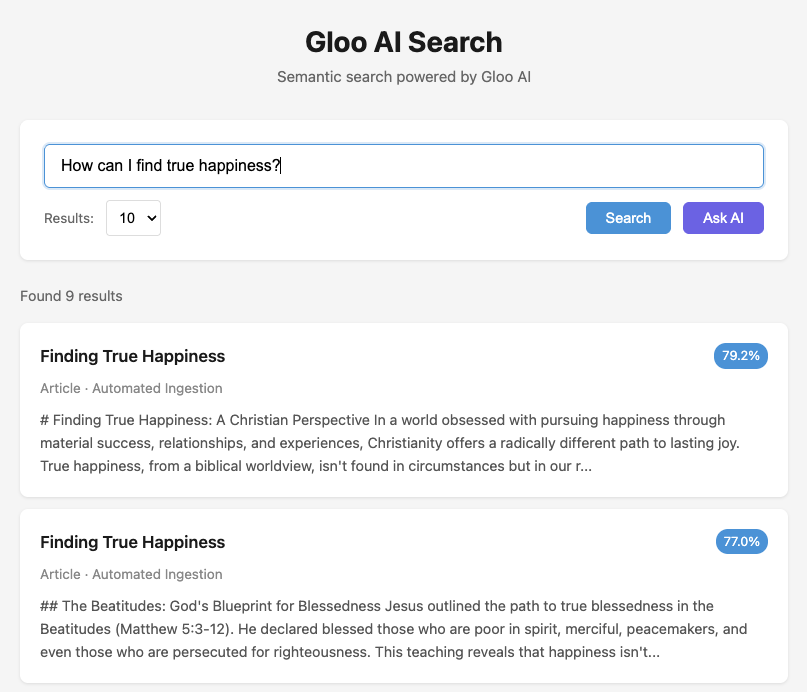
Search results showing content cards with titles, types, and relevance percentages

AI-Powered Answers (RAG)

Click Ask AI to send the same query through the RAG pipeline. The AI generates a response grounded in your search results, with sources listed:
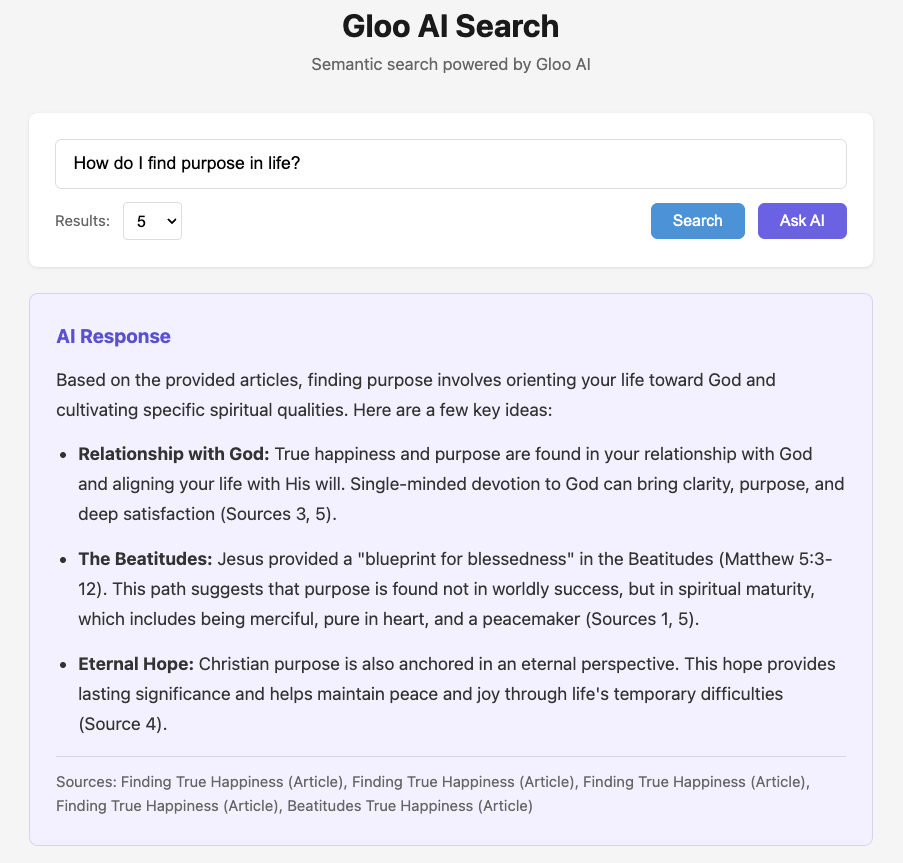
AI response generated from search results with source citations
The frontend is language-agnostic — the same HTML/JS works with any language’s proxy server. This is one approach; customize for your branding and framework.

Complete Working Examples

View Complete Code

Clone or browse the complete working examples for all 6 languages (JavaScript, TypeScript, Python, PHP, Go, Java) with setup instructions, proxy servers, and a browser-based frontend.

What’s Included

Each language implementation provides:
  • auth — Shared OAuth2 token management with automatic refresh
  • config — Centralized configuration (URLs, env vars, RAG settings)
  • search_basic — Basic search (CLI script)
  • search_advanced — Advanced search + RAG helpers (CLI script)
  • server — Proxy server exposing REST endpoints for the frontend

Troubleshooting

No Results Returned

  • Missing certainty: Add "certainty": 0.5 to your payload. The API defaults to 0.75 when omitted, which may be too strict.
  • Content not indexed: Test in the Search Playground first. If results appear there but not via API, check your tenant name.
  • Wrong tenant: Results are scoped to your publisher. Verify the tenant name matches your publisher in Organizations.

403 Forbidden

  • You can only access your own publisher’s content. Other tenant names return 403.
  • Verify your Client ID and Client Secret are correct and not expired.

Slow Responses

  • Reduce the limit parameter. Request time rises non-linearly with larger result sets.
  • Start with limit=10 and increase only as needed.

Authentication Errors

  • Tokens expire. Implement token refresh logic (see Authentication Tutorial).
  • Ensure you’re using Bearer {token} in the Authorization header.

Empty RAG Responses

  • Verify search returns results before calling Completions V2.
  • Use auto_routing: true instead of specifying a model name.

Next Steps