

The Recommendations API returns ranked content items from your publisher’s collection or the Gloo affiliate network. It is optimized for recommendation UI patterns, not open-ended search.
Prerequisites
Before starting, ensure you have:- A Gloo AI Studio account
- Your API key from the API Credentials page
- Your Tenant (publisher) name from Organizations in Studio
- Content uploaded to the Data Engine (see Upload Files Tutorial)
- Authentication setup — Complete the Authentication Tutorial first
Working Code Sample
Follow along with complete working examples in all 6 languages (JavaScript, TypeScript, Python, PHP, Go, Java). Includes a proxy server and browser-based frontend for each language.Setup and testing instructions are provided later.
The code snippets in this tutorial are simplified and self-contained —
designed for readability and easy copy-paste. The cookbook
examples
use a modular architecture plus production niceties. Both implement the same
APIs and patterns.
Understanding the Recommendations API
Three endpoints cover the main recommendation use cases:| Endpoint | Purpose |
|---|---|
POST /ai/v1/data/items/recommendations/base | Publisher-scoped ranked items — metadata only |
POST /ai/v1/data/items/recommendations/verbose | Publisher-scoped ranked items — includes full snippet text |
POST /ai/v1/data/affiliates/referenced-items | Cross-publisher discovery from the Gloo affiliate network |
Publisher Endpoints (base & verbose)
Both publisher endpoints share the same required parameters:| Parameter | Description |
|---|---|
query | The topic or question to match content against |
item_count | Number of items to return (1–50) |
certainty_threshold | Minimum relevance score (0–1). Default: 0.75 |
collection | Always "GlooProd" |
tenant | Your publisher (tenant) name |
Affiliate Endpoint
The affiliate endpoint searches across the full Gloo publisher network so nocollection or tenant is required:
| Parameter | Description |
|---|---|
query | The topic or question to match content against |
item_count | Number of items to return (1–50) |
certainty_threshold | Minimum relevance score. Default: 0.75 |
Response Structure
Publisher endpoints return an array of items. Each item includes auuids array with the matched snippet and its relevance metadata:
[
  {
    "item_id": "abc123",
    "item_title": "Finding True Happiness",
    "author": ["John Smith"],
    "item_url": "https://example.com/finding-true-happiness",
    "uuids": [
      {
        "uuid": "snippet-uuid",
        "ai_title": "The Path to Contentment",
        "ai_subtitle": "A practical guide",
        "item_summary": "Explores the foundations of lasting happiness...",
        "certainty": 0.89,
        "snippet": "Full snippet text here (verbose endpoint only)"
      }
    ]
  }
]
uuids[0].certainty— Relevance score (0–1, higher = more relevant)uuids[0].ai_title— AI-generated section title for the matched snippetuuids[0].item_summary— AI-generated summary of the itemuuids[0].snippet— Full snippet text (verbose endpoint only)
uuids, adding tradition and item_subtitle fields instead.
Step 1: Publisher Recommendations
Let’s fetch ranked content from your publisher’s collection. The base endpoint returns metadata only with no snippet text, making it ideal for clean list UIs.import requests, os, sys
from dotenv import load_dotenv
load_dotenv()
API_KEY = os.getenv("GLOO_API_KEY", "YOUR_API_KEY")
TENANT = os.getenv("GLOO_TENANT", "your-tenant-name")
COLLECTION = os.getenv("GLOO_COLLECTION", "GlooProd")
BASE_URL = "https://platform.ai.gloo.com/ai/v1/data/items/recommendations/base"
def get_recommendations(query, item_count=5):
payload = {
"query": query,
"item_count": item_count,
"certainty_threshold": 0.75,
"collection": COLLECTION,
"tenant": TENANT,
}
r = requests.post(
BASE_URL,
headers={"Authorization": f"Bearer {API_KEY}", "Content-Type": "application/json"},
json=payload,
timeout=60,
)
r.raise_for_status()
return r.json()
query = sys.argv[1] if len(sys.argv) > 1 else "How do I deal with anxiety?"
item_count = int(sys.argv[2]) if len(sys.argv) > 2 else 5
items = get_recommendations(query, item_count)
print(f"Found {len(items)} item(s):\n")
for i, item in enumerate(items, 1):
print(f"--- Item {i} ---")
print(f"Title: {item.get('item_title', 'N/A')}")
if item.get("author"):
print(f"Author: {', '.join(item['author'])}")
if item.get("uuids"):
top = item["uuids"][0]
print(f"Relevance: {top.get('certainty', 0):.0%}")
if top.get("ai_title"): print(f"Section: {top['ai_title']}")
if top.get("item_summary"): print(f"Summary: {top['item_summary']}")
print()
const axios = require('axios');
require('dotenv').config();

const API_KEY    = process.env.GLOO_API_KEY    || 'YOUR_API_KEY';
const TENANT     = process.env.GLOO_TENANT     || 'your-tenant-name';
const COLLECTION = process.env.GLOO_COLLECTION || 'GlooProd';
const BASE_URL   = 'https://platform.ai.gloo.com/ai/v1/data/items/recommendations/base';

async function getRecommendations(query, itemCount = 5) {
  const { data } = await axios.post(
    BASE_URL,
    { query, item_count: itemCount, certainty_threshold: 0.75, collection: COLLECTION, tenant: TENANT },
    { headers: { Authorization: `Bearer ${API_KEY}`, 'Content-Type': 'application/json' } }
  );
  return data;
}

(async () => {
  const query     = process.argv[2] || 'How do I deal with anxiety?';
  const itemCount = parseInt(process.argv[3]) || 5;

  const items = await getRecommendations(query, itemCount);
  console.log(`Found ${items.length} item(s):\n`);
  items.forEach((item, i) => {
    console.log(`--- Item ${i + 1} ---`);
    console.log(`Title:  ${item.item_title || 'N/A'}`);
    if (item.author?.length) console.log(`Author: ${item.author.join(', ')}`);
    const top = item.uuids?.[0];
    if (top) {
      console.log(`Relevance: ${Math.round(top.certainty * 100)}%`);
      if (top.ai_title)     console.log(`Section:   ${top.ai_title}`);
      if (top.item_summary) console.log(`Summary:   ${top.item_summary}`);
    }
    console.log();
  });
})();
import axios from 'axios';
import * as dotenv from 'dotenv';
dotenv.config();

const API_KEY    = process.env.GLOO_API_KEY    ?? 'YOUR_API_KEY';
const TENANT     = process.env.GLOO_TENANT     ?? 'your-tenant-name';
const COLLECTION = process.env.GLOO_COLLECTION ?? 'GlooProd';
const BASE_URL   = 'https://platform.ai.gloo.com/ai/v1/data/items/recommendations/base';

interface SnippetUUID {
  ai_title: string; item_summary: string; certainty: number;
}
interface RecommendationItem {
  item_title: string; author: string[]; item_url: string; uuids: SnippetUUID[];
}

async function getRecommendations(query: string, itemCount = 5): Promise<RecommendationItem[]> {
  const { data } = await axios.post<RecommendationItem[]>(
    BASE_URL,
    { query, item_count: itemCount, certainty_threshold: 0.75, collection: COLLECTION, tenant: TENANT },
    { headers: { Authorization: `Bearer ${API_KEY}`, 'Content-Type': 'application/json' } }
  );
  return data;
}

(async () => {
  const query     = process.argv[2] ?? 'How do I deal with anxiety?';
  const itemCount = parseInt(process.argv[3] ?? '5');

  const items = await getRecommendations(query, itemCount);
  console.log(`Found ${items.length} item(s):\n`);
  items.forEach((item, i) => {
    console.log(`--- Item ${i + 1} ---`);
    console.log(`Title:  ${item.item_title ?? 'N/A'}`);
    if (item.author?.length) console.log(`Author: ${item.author.join(', ')}`);
    const top = item.uuids?.[0];
    if (top) {
      console.log(`Relevance: ${Math.round(top.certainty * 100)}%`);
      if (top.ai_title)     console.log(`Section:   ${top.ai_title}`);
      if (top.item_summary) console.log(`Summary:   ${top.item_summary}`);
    }
    console.log();
  });
})();
<?php
declare(strict_types=1);
require_once __DIR__ . '/vendor/autoload.php';
$dotenv = Dotenv\Dotenv::createImmutable(__DIR__); $dotenv->safeLoad();

$API_KEY    = $_ENV['GLOO_API_KEY']    ?? 'YOUR_API_KEY';
$TENANT     = $_ENV['GLOO_TENANT']     ?? 'your-tenant-name';
$COLLECTION = $_ENV['GLOO_COLLECTION'] ?? 'GlooProd';
$BASE_URL   = 'https://platform.ai.gloo.com/ai/v1/data/items/recommendations/base';

function getRecommendations(string $query, int $itemCount = 5): array {
    global $COLLECTION, $TENANT, $BASE_URL, $API_KEY;
    $ch = curl_init($BASE_URL);
    curl_setopt_array($ch, [
        CURLOPT_RETURNTRANSFER => true,
        CURLOPT_POST           => true,
        CURLOPT_POSTFIELDS     => json_encode([
            'query' => $query, 'item_count' => $itemCount,
            'certainty_threshold' => 0.75,
            'collection' => $COLLECTION, 'tenant' => $TENANT,
        ]),
        CURLOPT_HTTPHEADER => [
            'Authorization: Bearer ' . $API_KEY,
            'Content-Type: application/json',
        ],
        CURLOPT_TIMEOUT => 60,
    ]);
    $result = curl_exec($ch); curl_close($ch);
    return json_decode($result, true);
}

$query     = $argv[1] ?? 'How do I deal with anxiety?';
$itemCount = (int)($argv[2] ?? 5);

$items = getRecommendations($query, $itemCount);
echo "Found " . count($items) . " item(s):\n\n";
foreach ($items as $i => $item) {
    echo "--- Item " . ($i + 1) . " ---\n";
    echo "Title:  " . ($item['item_title'] ?? 'N/A') . "\n";
    if (!empty($item['author'])) echo "Author: " . implode(', ', $item['author']) . "\n";
    if (!empty($item['uuids'])) {
        $top = $item['uuids'][0];
        echo "Relevance: " . round($top['certainty'] * 100) . "%\n";
        if (!empty($top['ai_title']))     echo "Section:   " . $top['ai_title'] . "\n";
        if (!empty($top['item_summary'])) echo "Summary:   " . $top['item_summary'] . "\n";
    }
    echo "\n";
}
package main

import (
    "bytes"
    "encoding/json"
    "fmt"
    "io"
    "net/http"
    "os"
    "strconv"
    "strings"

    "github.com/joho/godotenv"
)

var (
    apiKey, tenant, collection string
    baseURL = "https://platform.ai.gloo.com/ai/v1/data/items/recommendations/base"
)

type RecommendationsRequest struct {
    Query              string  `json:"query"`
    ItemCount          int     `json:"item_count"`
    CertaintyThreshold float64 `json:"certainty_threshold"`
    Collection         string  `json:"collection"`
    Tenant             string  `json:"tenant"`
}

type SnippetUUID struct {
    AITitle     string  `json:"ai_title"`
    ItemSummary string  `json:"item_summary"`
    Certainty   float64 `json:"certainty"`
}

type RecommendationItem struct {
    ItemTitle string       `json:"item_title"`
    Author    []string     `json:"author"`
    ItemURL   string       `json:"item_url"`
    UUIDs     []SnippetUUID `json:"uuids"`
}

func getRecommendations(query string, itemCount int) []RecommendationItem {
    payload, _ := json.Marshal(RecommendationsRequest{
        Query: query, ItemCount: itemCount, CertaintyThreshold: 0.75,
        Collection: collection, Tenant: tenant,
    })
    req, _ := http.NewRequest("POST", baseURL, bytes.NewBuffer(payload))
    req.Header.Set("Authorization", "Bearer "+apiKey)
    req.Header.Set("Content-Type", "application/json")
    resp, _ := http.DefaultClient.Do(req)
    defer resp.Body.Close()
    body, _ := io.ReadAll(resp.Body)
    var items []RecommendationItem
    json.Unmarshal(body, &items)
    return items
}

func main() {
    godotenv.Load()
    apiKey     = os.Getenv("GLOO_API_KEY")
    tenant     = os.Getenv("GLOO_TENANT")
    collection = os.Getenv("GLOO_COLLECTION")
    if collection == "" { collection = "GlooProd" }

    query     := "How do I deal with anxiety?"
    itemCount := 5
    if len(os.Args) > 1 { query = os.Args[1] }
    if len(os.Args) > 2 { itemCount, _ = strconv.Atoi(os.Args[2]) }

    items := getRecommendations(query, itemCount)
    fmt.Printf("Found %d item(s):\n\n", len(items))
    for i, item := range items {
        fmt.Printf("--- Item %d ---\n", i+1)
        fmt.Printf("Title:  %s\n", item.ItemTitle)
        if len(item.Author) > 0 {
            fmt.Printf("Author: %s\n", strings.Join(item.Author, ", "))
        }
        if len(item.UUIDs) > 0 {
            top := item.UUIDs[0]
            fmt.Printf("Relevance: %.0f%%\n", top.Certainty*100)
            if top.AITitle != ""     { fmt.Printf("Section:   %s\n", top.AITitle) }
            if top.ItemSummary != "" { fmt.Printf("Summary:   %s\n", top.ItemSummary) }
        }
        fmt.Println()
    }
}
import com.google.gson.Gson;
import com.google.gson.reflect.TypeToken;
import io.github.cdimascio.dotenv.Dotenv;

import java.net.URI;
import java.net.http.*;
import java.time.Duration;
import java.util.List;

public class Recommendations {

    static final Dotenv dotenv = Dotenv.configure().ignoreIfMissing().load();
    static final String API_KEY    = dotenv.get("GLOO_API_KEY", "YOUR_API_KEY");
    static final String TENANT     = dotenv.get("GLOO_TENANT", "your-tenant-name");
    static final String COLLECTION = dotenv.get("GLOO_COLLECTION", "GlooProd");
    static final String BASE_URL   = "https://platform.ai.gloo.com/ai/v1/data/items/recommendations/base";

    static final HttpClient http = HttpClient.newBuilder()
            .connectTimeout(Duration.ofSeconds(30)).build();
    static final Gson gson = new Gson();

    static class Req { String query; int item_count; double certainty_threshold;
                       String collection; String tenant; }
    static class UUID { String ai_title; String item_summary; double certainty; }
    static class Item { String item_title; List<String> author; List<UUID> uuids; }

    static List<Item> getRecommendations(String query, int itemCount) throws Exception {
        Req payload = new Req();
        payload.query = query; payload.item_count = itemCount;
        payload.certainty_threshold = 0.75;
        payload.collection = COLLECTION; payload.tenant = TENANT;

        HttpResponse<String> resp = http.send(
            HttpRequest.newBuilder().uri(URI.create(BASE_URL))
                .header("Authorization", "Bearer " + API_KEY)
                .header("Content-Type", "application/json")
                .POST(HttpRequest.BodyPublishers.ofString(gson.toJson(payload)))
                .timeout(Duration.ofSeconds(60)).build(),
            HttpResponse.BodyHandlers.ofString());
        return gson.fromJson(resp.body(), new TypeToken<List<Item>>() {}.getType());
    }

    public static void main(String[] args) throws Exception {
        String query  = args.length > 0 ? args[0] : "How do I deal with anxiety?";
        int itemCount = args.length > 1 ? Integer.parseInt(args[1]) : 5;

        List<Item> items = getRecommendations(query, itemCount);
        System.out.printf("Found %d item(s):%n%n", items.size());
        for (int i = 0; i < items.size(); i++) {
            Item item = items.get(i);
            System.out.printf("--- Item %d ---%n", i + 1);
            System.out.printf("Title:  %s%n", item.item_title != null ? item.item_title : "N/A");
            if (item.author != null && !item.author.isEmpty())
                System.out.printf("Author: %s%n", String.join(", ", item.author));
            if (item.uuids != null && !item.uuids.isEmpty()) {
                UUID top = item.uuids.get(0);
                System.out.printf("Relevance: %.0f%%%n", top.certainty * 100);
                if (top.ai_title != null)    System.out.printf("Section:   %s%n", top.ai_title);
                if (top.item_summary != null) System.out.printf("Summary:   %s%n", top.item_summary);
            }
            System.out.println();
        }
    }
}
What You’ll See
A successful call returns up to 5 items with metadata such as the title, summary, and relevance score:Found 3 item(s):
--- Item 1 ---
Title: Finding True Happiness
Author: John Smith
Relevance: 89%
Section: The Path to Contentment
Summary: This article explores the foundations of lasting happiness from a biblical perspective.
--- Item 2 ---
Title: Overcoming Anxiety and Fear
Author: Jane Doe
Relevance: 84%
Section: Trusting God in Difficult Times
Summary: Practical guidance on releasing anxiety through prayer and scripture.
--- Item 3 ---
Title: Peace That Passes Understanding
Author: John Smith
Relevance: 81%
Section: Philippians 4 Applied
Summary: A study of Philippians 4:6-7 and its application to modern anxiety.
Summary and Section may not appear for every item — they are AI-generated metadata that depends on how content was processed during ingestion. Older or minimally processed content may return only Title, Author, and Relevance.
Run the Cookbook Example
The cookbook includes a ready-to-run basic search script for each language:cd recommendations/python
python -m venv venv && source venv/bin/activate
pip install -r requirements.txt
python recommend_base.py "How do I deal with anxiety?"
python recommend_base.py "parenting teenagers" 3
cd recommendations/javascript
npm install
node recommend-base.js "How do I deal with anxiety?"
node recommend-base.js "parenting teenagers" 3
cd recommendations/typescript
npm install
npx ts-node recommend-base.ts "How do I deal with anxiety?"
npx ts-node recommend-base.ts "parenting teenagers" 3
cd recommendations/php
composer install
php recommend_base.php "How do I deal with anxiety?"
php recommend_base.php "parenting teenagers" 3
cd recommendations/go
go mod tidy
go run . base "How do I deal with anxiety?"
go run . base "parenting teenagers" 3
cd recommendations/java
mvn compile -q
mvn -q exec:java -Dexec.args='base "How do I deal with anxiety?"'
mvn -q exec:java -Dexec.args='base "parenting teenagers" 3'
Getting no results? Work through these in order:
- Test your query in the Search Playground — if nothing shows there, your content may not be indexed yet.
- Try a different query that you know returns results in the Playground.
- If the Playground returns results but your code doesn’t, lower
certainty_thresholdfrom0.75to0.5to match the Playground’s default.
Step 2: Recommendations with Snippet Previews
The verbose endpoint adds full snippet text to each result. This is ideal for content preview cards where you want to show a passage alongside the title. The only change from Step 1 is the endpoint URL and readinguuids[0].snippet from the response.
import requests, os, sys
from dotenv import load_dotenv
load_dotenv()

API_KEY       = os.getenv("GLOO_API_KEY", "YOUR_API_KEY")
TENANT        = os.getenv("GLOO_TENANT", "your-tenant-name")
COLLECTION    = os.getenv("GLOO_COLLECTION", "GlooProd")
VERBOSE_URL   = "https://platform.ai.gloo.com/ai/v1/data/items/recommendations/verbose"

def get_verbose(query, item_count=5):
    r = requests.post(
        VERBOSE_URL,
        headers={"Authorization": f"Bearer {API_KEY}", "Content-Type": "application/json"},
        json={
            "query": query, "item_count": item_count, "certainty_threshold": 0.75,
            "collection": COLLECTION, "tenant": TENANT,
        },
        timeout=60,
    )
    r.raise_for_status()
    return r.json()

query      = sys.argv[1] if len(sys.argv) > 1 else "How do I deal with anxiety?"
item_count = int(sys.argv[2]) if len(sys.argv) > 2 else 5

items = get_verbose(query, item_count)
print(f"Found {len(items)} item(s):\n")
for i, item in enumerate(items, 1):
    print(f"--- Item {i} ---")
    print(f"Title:  {item.get('item_title', 'N/A')}")
    if item.get("author"):
        print(f"Author: {', '.join(item['author'])}")
    if item.get("uuids"):
        top = item["uuids"][0]
        print(f"Relevance: {top.get('certainty', 0):.0%}")
        if top.get("ai_title"):     print(f"Section:   {top['ai_title']}")
        if top.get("item_summary"): print(f"Summary:   {top['item_summary']}")
        snippet = top.get("snippet", "")
        if snippet:
            print(f"Preview:   \"{snippet[:200]}{'...' if len(snippet) > 200 else ''}\"")
    print()
const axios = require('axios');
require('dotenv').config();

const API_KEY    = process.env.GLOO_API_KEY    || 'YOUR_API_KEY';
const TENANT     = process.env.GLOO_TENANT     || 'your-tenant-name';
const COLLECTION = process.env.GLOO_COLLECTION || 'GlooProd';
const VERBOSE_URL = 'https://platform.ai.gloo.com/ai/v1/data/items/recommendations/verbose';

async function getVerbose(query, itemCount = 5) {
  const { data } = await axios.post(
    VERBOSE_URL,
    { query, item_count: itemCount, certainty_threshold: 0.75, collection: COLLECTION, tenant: TENANT },
    { headers: { Authorization: `Bearer ${API_KEY}`, 'Content-Type': 'application/json' } }
  );
  return data;
}

(async () => {
  const query     = process.argv[2] || 'How do I deal with anxiety?';
  const itemCount = parseInt(process.argv[3]) || 5;

  const items = await getVerbose(query, itemCount);
  console.log(`Found ${items.length} item(s):\n`);
  items.forEach((item, i) => {
    console.log(`--- Item ${i + 1} ---`);
    console.log(`Title:  ${item.item_title || 'N/A'}`);
    if (item.author?.length) console.log(`Author: ${item.author.join(', ')}`);
    const top = item.uuids?.[0];
    if (top) {
      console.log(`Relevance: ${Math.round(top.certainty * 100)}%`);
      if (top.ai_title)     console.log(`Section:   ${top.ai_title}`);
      if (top.item_summary) console.log(`Summary:   ${top.item_summary}`);
      if (top.snippet) {
        const preview = top.snippet.length > 200 ? top.snippet.slice(0, 200) + '...' : top.snippet;
        console.log(`Preview:   "${preview}"`);
      }
    }
    console.log();
  });
})();
import axios from 'axios';
import * as dotenv from 'dotenv';
dotenv.config();

const API_KEY    = process.env.GLOO_API_KEY    ?? 'YOUR_API_KEY';
const TENANT     = process.env.GLOO_TENANT     ?? 'your-tenant-name';
const COLLECTION = process.env.GLOO_COLLECTION ?? 'GlooProd';
const VERBOSE_URL = 'https://platform.ai.gloo.com/ai/v1/data/items/recommendations/verbose';

interface SnippetUUID {
  ai_title: string; item_summary: string; certainty: number; snippet?: string;
}
interface RecommendationItem {
  item_title: string; author: string[]; uuids: SnippetUUID[];
}

async function getVerbose(query: string, itemCount = 5): Promise<RecommendationItem[]> {
  const { data } = await axios.post<RecommendationItem[]>(
    VERBOSE_URL,
    { query, item_count: itemCount, certainty_threshold: 0.75, collection: COLLECTION, tenant: TENANT },
    { headers: { Authorization: `Bearer ${API_KEY}`, 'Content-Type': 'application/json' } }
  );
  return data;
}

(async () => {
  const query     = process.argv[2] ?? 'How do I deal with anxiety?';
  const itemCount = parseInt(process.argv[3] ?? '5');

  const items = await getVerbose(query, itemCount);
  console.log(`Found ${items.length} item(s):\n`);
  items.forEach((item, i) => {
    console.log(`--- Item ${i + 1} ---`);
    console.log(`Title:  ${item.item_title ?? 'N/A'}`);
    if (item.author?.length) console.log(`Author: ${item.author.join(', ')}`);
    const top = item.uuids?.[0];
    if (top) {
      console.log(`Relevance: ${Math.round(top.certainty * 100)}%`);
      if (top.ai_title)     console.log(`Section:   ${top.ai_title}`);
      if (top.item_summary) console.log(`Summary:   ${top.item_summary}`);
      if (top.snippet) {
        const preview = top.snippet.length > 200 ? top.snippet.slice(0, 200) + '...' : top.snippet;
        console.log(`Preview:   "${preview}"`);
      }
    }
    console.log();
  });
})();
<?php
declare(strict_types=1);
require_once __DIR__ . '/vendor/autoload.php';
$dotenv = Dotenv\Dotenv::createImmutable(__DIR__); $dotenv->safeLoad();

$API_KEY       = $_ENV['GLOO_API_KEY']       ?? 'YOUR_API_KEY';
$TENANT        = $_ENV['GLOO_TENANT']        ?? 'your-tenant-name';
$COLLECTION    = $_ENV['GLOO_COLLECTION']    ?? 'GlooProd';
$VERBOSE_URL   = 'https://platform.ai.gloo.com/ai/v1/data/items/recommendations/verbose';

function getVerbose(string $query, int $itemCount = 5): array {
    global $COLLECTION, $TENANT, $VERBOSE_URL, $API_KEY;
    $ch = curl_init($VERBOSE_URL);
    curl_setopt_array($ch, [
        CURLOPT_RETURNTRANSFER => true,
        CURLOPT_POST           => true,
        CURLOPT_POSTFIELDS     => json_encode([
            'query' => $query, 'item_count' => $itemCount,
            'certainty_threshold' => 0.75,
            'collection' => $COLLECTION, 'tenant' => $TENANT,
        ]),
        CURLOPT_HTTPHEADER => [
            'Authorization: Bearer ' . $API_KEY,
            'Content-Type: application/json',
        ],
        CURLOPT_TIMEOUT => 60,
    ]);
    $result = curl_exec($ch); curl_close($ch);
    return json_decode($result, true);
}

$query     = $argv[1] ?? 'How do I deal with anxiety?';
$itemCount = (int)($argv[2] ?? 5);

$items = getVerbose($query, $itemCount);
echo "Found " . count($items) . " item(s):\n\n";
foreach ($items as $i => $item) {
    echo "--- Item " . ($i + 1) . " ---\n";
    echo "Title:  " . ($item['item_title'] ?? 'N/A') . "\n";
    if (!empty($item['author'])) echo "Author: " . implode(', ', $item['author']) . "\n";
    if (!empty($item['uuids'])) {
        $top = $item['uuids'][0];
        echo "Relevance: " . round($top['certainty'] * 100) . "%\n";
        if (!empty($top['ai_title']))     echo "Section:   " . $top['ai_title'] . "\n";
        if (!empty($top['item_summary'])) echo "Summary:   " . $top['item_summary'] . "\n";
        if (!empty($top['snippet'])) {
            $preview = mb_substr($top['snippet'], 0, 200);
            if (mb_strlen($top['snippet']) > 200) $preview .= '...';
            echo "Preview:   \"$preview\"\n";
        }
    }
    echo "\n";
}
package main

import (
    "bytes"
    "encoding/json"
    "fmt"
    "io"
    "net/http"
    "os"
    "strconv"
    "strings"

    "github.com/joho/godotenv"
)

var (
    apiKey, tenant, collection string
    verboseURL = "https://platform.ai.gloo.com/ai/v1/data/items/recommendations/verbose"
)

type RecommendationsRequest struct {
    Query              string  `json:"query"`
    ItemCount          int     `json:"item_count"`
    CertaintyThreshold float64 `json:"certainty_threshold"`
    Collection         string  `json:"collection"`
    Tenant             string  `json:"tenant"`
}

type SnippetUUID struct {
    AITitle     string  `json:"ai_title"`
    ItemSummary string  `json:"item_summary"`
    Certainty   float64 `json:"certainty"`
    Snippet     string  `json:"snippet"`
}

type RecommendationItem struct {
    ItemTitle string        `json:"item_title"`
    Author    []string      `json:"author"`
    UUIDs     []SnippetUUID `json:"uuids"`
}

func getVerbose(query string, itemCount int) []RecommendationItem {
    payload, _ := json.Marshal(RecommendationsRequest{
        Query: query, ItemCount: itemCount, CertaintyThreshold: 0.75,
        Collection: collection, Tenant: tenant,
    })
    req, _ := http.NewRequest("POST", verboseURL, bytes.NewBuffer(payload))
    req.Header.Set("Authorization", "Bearer "+apiKey)
    req.Header.Set("Content-Type", "application/json")
    resp, _ := http.DefaultClient.Do(req)
    defer resp.Body.Close()
    body, _ := io.ReadAll(resp.Body)
    var items []RecommendationItem
    json.Unmarshal(body, &items)
    return items
}

func main() {
    godotenv.Load()
    apiKey     = os.Getenv("GLOO_API_KEY")
    tenant     = os.Getenv("GLOO_TENANT")
    collection = os.Getenv("GLOO_COLLECTION")
    if collection == "" { collection = "GlooProd" }

    query     := "How do I deal with anxiety?"
    itemCount := 5
    if len(os.Args) > 1 { query = os.Args[1] }
    if len(os.Args) > 2 { itemCount, _ = strconv.Atoi(os.Args[2]) }

    items := getVerbose(query, itemCount)
    fmt.Printf("Found %d item(s):\n\n", len(items))
    for i, item := range items {
        fmt.Printf("--- Item %d ---\n", i+1)
        fmt.Printf("Title:  %s\n", item.ItemTitle)
        if len(item.Author) > 0 {
            fmt.Printf("Author: %s\n", strings.Join(item.Author, ", "))
        }
        if len(item.UUIDs) > 0 {
            top := item.UUIDs[0]
            fmt.Printf("Relevance: %.0f%%\n", top.Certainty*100)
            if top.AITitle != ""     { fmt.Printf("Section:   %s\n", top.AITitle) }
            if top.ItemSummary != "" { fmt.Printf("Summary:   %s\n", top.ItemSummary) }
            if top.Snippet != "" {
                preview := top.Snippet
                if len(preview) > 200 { preview = preview[:200] + "..." }
                fmt.Printf("Preview:   %q\n", preview)
            }
        }
        fmt.Println()
    }
}
import com.google.gson.Gson;
import com.google.gson.reflect.TypeToken;
import io.github.cdimascio.dotenv.Dotenv;

import java.net.URI;
import java.net.http.*;
import java.time.Duration;
import java.util.List;

public class RecommendationsVerbose {

    static final Dotenv dotenv = Dotenv.configure().ignoreIfMissing().load();
    static final String API_KEY = dotenv.get("GLOO_API_KEY", "YOUR_API_KEY");
    static final String TENANT        = dotenv.get("GLOO_TENANT", "your-tenant-name");
    static final String COLLECTION    = dotenv.get("GLOO_COLLECTION", "GlooProd");
    static final String VERBOSE_URL   = "https://platform.ai.gloo.com/ai/v1/data/items/recommendations/verbose";

    static final HttpClient http = HttpClient.newBuilder()
            .connectTimeout(Duration.ofSeconds(30)).build();
    static final Gson gson = new Gson();

    static class Req { String query; int item_count; double certainty_threshold;
                       String collection; String tenant; }
    static class UUID { String ai_title; String item_summary; double certainty; String snippet; }
    static class Item { String item_title; List<String> author; List<UUID> uuids; }

    static List<Item> getVerbose(String query, int itemCount) throws Exception {
        Req payload = new Req();
        payload.query = query; payload.item_count = itemCount;
        payload.certainty_threshold = 0.75;
        payload.collection = COLLECTION; payload.tenant = TENANT;

        HttpResponse<String> resp = http.send(
            HttpRequest.newBuilder().uri(URI.create(VERBOSE_URL))
                .header("Authorization", "Bearer " + API_KEY)
                .header("Content-Type", "application/json")
                .POST(HttpRequest.BodyPublishers.ofString(gson.toJson(payload)))
                .timeout(Duration.ofSeconds(60)).build(),
            HttpResponse.BodyHandlers.ofString());
        return gson.fromJson(resp.body(), new TypeToken<List<Item>>() {}.getType());
    }

    public static void main(String[] args) throws Exception {
        String query  = args.length > 0 ? args[0] : "How do I deal with anxiety?";
        int itemCount = args.length > 1 ? Integer.parseInt(args[1]) : 5;

        List<Item> items = getVerbose(query, itemCount);
        System.out.printf("Found %d item(s):%n%n", items.size());
        for (int i = 0; i < items.size(); i++) {
            Item item = items.get(i);
            System.out.printf("--- Item %d ---%n", i + 1);
            System.out.printf("Title:  %s%n", item.item_title != null ? item.item_title : "N/A");
            if (item.author != null && !item.author.isEmpty())
                System.out.printf("Author: %s%n", String.join(", ", item.author));
            if (item.uuids != null && !item.uuids.isEmpty()) {
                UUID top = item.uuids.get(0);
                System.out.printf("Relevance: %.0f%%%n", top.certainty * 100);
                if (top.ai_title != null)    System.out.printf("Section:   %s%n", top.ai_title);
                if (top.item_summary != null) System.out.printf("Summary:   %s%n", top.item_summary);
                if (top.snippet != null && !top.snippet.isEmpty()) {
                    String preview = top.snippet.length() > 200
                            ? top.snippet.substring(0, 200) + "..." : top.snippet;
                    System.out.printf("Preview:   \"%s\"%n", preview);
                }
            }
            System.out.println();
        }
    }
}
What You’ll See
Same as Step 1, with aPreview line added for each item:
--- Item 1 ---
Title:  Finding True Happiness
Author: John Smith
Relevance: 89%
Section:   The Path to Contentment
Summary:   This article explores the foundations of lasting happiness from a biblical perspective.
Preview:   "True happiness is not found in circumstances but in relationship. The Beatitudes
            describe a person who is blessed not because of what they have, but because of who..."
Run the Cookbook Example
python recommend_verbose.py "How do I deal with anxiety?"
python recommend_verbose.py "parenting teenagers" 3
node recommend-verbose.js "How do I deal with anxiety?"
node recommend-verbose.js "parenting teenagers" 3
npx ts-node recommend-verbose.ts "How do I deal with anxiety?"
npx ts-node recommend-verbose.ts "parenting teenagers" 3
php recommend_verbose.php "How do I deal with anxiety?"
php recommend_verbose.php "parenting teenagers" 3
go run . verbose "How do I deal with anxiety?"
go run . verbose "parenting teenagers" 3
mvn -q exec:java -Dexec.args='verbose "How do I deal with anxiety?"'
mvn -q exec:java -Dexec.args='verbose "parenting teenagers" 3'
Step 3: Affiliate Network Discovery
The affiliate endpoint surfaces content from across the entire Gloo publisher network and not just your own collection. Use this to power “Explore More” sections that introduce users to resources from other publishers. Two key differences from the publisher endpoints:- No
collectionortenantin the request — the search spans the full affiliate network - Flat response structure — items have
traditionanditem_subtitlefields instead ofuuids
import requests, os, sys
from dotenv import load_dotenv
load_dotenv()

API_KEY        = os.getenv("GLOO_API_KEY", "YOUR_API_KEY")
AFFILIATES_URL = "https://platform.ai.gloo.com/ai/v1/data/affiliates/referenced-items"

def get_affiliates(query, item_count=5):
    r = requests.post(
        AFFILIATES_URL,
        headers={"Authorization": f"Bearer {API_KEY}", "Content-Type": "application/json"},
        json={"query": query, "item_count": item_count, "certainty_threshold": 0.75},
        timeout=60,
    )
    r.raise_for_status()
    return r.json()

query      = sys.argv[1] if len(sys.argv) > 1 else "How do I deal with anxiety?"
item_count = int(sys.argv[2]) if len(sys.argv) > 2 else 5

items = get_affiliates(query, item_count)
print(f"Found {len(items)} item(s) from across the affiliate network:\n")
for i, item in enumerate(items, 1):
    print(f"--- Item {i} ---")
    print(f"Title:     {item.get('item_title', 'N/A')}")
    if item.get("author"):
        print(f"Author:    {', '.join(item['author'])}")
    if item.get("tradition"):
        print(f"Tradition: {item['tradition']}")
    if item.get("item_subtitle"):
        print(f"Subtitle:  {item['item_subtitle']}")
    if item.get("item_url"):
        print(f"URL:       {item['item_url']}")
    print()
const axios = require('axios');
require('dotenv').config();

const API_KEY        = process.env.GLOO_API_KEY || 'YOUR_API_KEY';
const AFFILIATES_URL = 'https://platform.ai.gloo.com/ai/v1/data/affiliates/referenced-items';

async function getAffiliates(query, itemCount = 5) {
  const { data } = await axios.post(
    AFFILIATES_URL,
    { query, item_count: itemCount, certainty_threshold: 0.75 },
    { headers: { Authorization: `Bearer ${API_KEY}`, 'Content-Type': 'application/json' } }
  );
  return data;
}

(async () => {
  const query     = process.argv[2] || 'How do I deal with anxiety?';
  const itemCount = parseInt(process.argv[3]) || 5;

  const items = await getAffiliates(query, itemCount);
  console.log(`Found ${items.length} item(s) from across the affiliate network:\n`);
  items.forEach((item, i) => {
    console.log(`--- Item ${i + 1} ---`);
    console.log(`Title:     ${item.item_title || 'N/A'}`);
    if (item.author?.length)  console.log(`Author:    ${item.author.join(', ')}`);
    if (item.tradition)       console.log(`Tradition: ${item.tradition}`);
    if (item.item_subtitle)   console.log(`Subtitle:  ${item.item_subtitle}`);
    if (item.item_url)        console.log(`URL:       ${item.item_url}`);
    console.log();
  });
})();
import axios from 'axios';
import * as dotenv from 'dotenv';
dotenv.config();

const API_KEY        = process.env.GLOO_API_KEY ?? 'YOUR_API_KEY';
const AFFILIATES_URL = 'https://platform.ai.gloo.com/ai/v1/data/affiliates/referenced-items';

interface AffiliateItem {
  item_title: string; item_subtitle?: string; author: string[];
  tradition?: string; item_url?: string;
}

async function getAffiliates(query: string, itemCount = 5): Promise<AffiliateItem[]> {
  const { data } = await axios.post<AffiliateItem[]>(
    AFFILIATES_URL,
    { query, item_count: itemCount, certainty_threshold: 0.75 },
    { headers: { Authorization: `Bearer ${API_KEY}`, 'Content-Type': 'application/json' } }
  );
  return data;
}

(async () => {
  const query     = process.argv[2] ?? 'How do I deal with anxiety?';
  const itemCount = parseInt(process.argv[3] ?? '5');

  const items = await getAffiliates(query, itemCount);
  console.log(`Found ${items.length} item(s) from across the affiliate network:\n`);
  items.forEach((item, i) => {
    console.log(`--- Item ${i + 1} ---`);
    console.log(`Title:     ${item.item_title ?? 'N/A'}`);
    if (item.author?.length)  console.log(`Author:    ${item.author.join(', ')}`);
    if (item.tradition)       console.log(`Tradition: ${item.tradition}`);
    if (item.item_subtitle)   console.log(`Subtitle:  ${item.item_subtitle}`);
    if (item.item_url)        console.log(`URL:       ${item.item_url}`);
    console.log();
  });
})();
<?php
declare(strict_types=1);
require_once __DIR__ . '/vendor/autoload.php';
$dotenv = Dotenv\Dotenv::createImmutable(__DIR__); $dotenv->safeLoad();

$API_KEY        = $_ENV['GLOO_API_KEY']       ?? 'YOUR_API_KEY';
$AFFILIATES_URL = 'https://platform.ai.gloo.com/ai/v1/data/affiliates/referenced-items';

function getAffiliates(string $query, int $itemCount = 5): array {
    global $AFFILIATES_URL, $API_KEY;
    $ch = curl_init($AFFILIATES_URL);
    curl_setopt_array($ch, [
        CURLOPT_RETURNTRANSFER => true,
        CURLOPT_POST           => true,
        CURLOPT_POSTFIELDS     => json_encode([
            'query' => $query, 'item_count' => $itemCount,
            'certainty_threshold' => 0.75,
        ]),
        CURLOPT_HTTPHEADER => [
            'Authorization: Bearer ' . $API_KEY,
            'Content-Type: application/json',
        ],
        CURLOPT_TIMEOUT => 60,
    ]);
    $result = curl_exec($ch); curl_close($ch);
    return json_decode($result, true);
}

$query     = $argv[1] ?? 'How do I deal with anxiety?';
$itemCount = (int)($argv[2] ?? 5);

$items = getAffiliates($query, $itemCount);
echo "Found " . count($items) . " item(s) from across the affiliate network:\n\n";
foreach ($items as $i => $item) {
    echo "--- Item " . ($i + 1) . " ---\n";
    echo "Title:     " . ($item['item_title'] ?? 'N/A') . "\n";
    if (!empty($item['author']))       echo "Author:    " . implode(', ', $item['author']) . "\n";
    if (!empty($item['tradition']))    echo "Tradition: " . $item['tradition'] . "\n";
    if (!empty($item['item_subtitle'])) echo "Subtitle:  " . $item['item_subtitle'] . "\n";
    if (!empty($item['item_url']))     echo "URL:       " . $item['item_url'] . "\n";
    echo "\n";
}
package main

import (
    "bytes"
    "encoding/json"
    "fmt"
    "io"
    "net/http"
    "os"
    "strconv"
    "strings"

    "github.com/joho/godotenv"
)

var (
    apiKey string
    affiliatesURL = "https://platform.ai.gloo.com/ai/v1/data/affiliates/referenced-items"
)

type AffiliatesRequest struct {
    Query              string  `json:"query"`
    ItemCount          int     `json:"item_count"`
    CertaintyThreshold float64 `json:"certainty_threshold"`
}

type AffiliateItem struct {
    ItemTitle    string   `json:"item_title"`
    ItemSubtitle string   `json:"item_subtitle"`
    Author       []string `json:"author"`
    Tradition    string   `json:"tradition"`
    ItemURL      string   `json:"item_url"`
}

func getAffiliates(query string, itemCount int) []AffiliateItem {
    payload, _ := json.Marshal(AffiliatesRequest{
        Query: query, ItemCount: itemCount, CertaintyThreshold: 0.75,
    })
    req, _ := http.NewRequest("POST", affiliatesURL, bytes.NewBuffer(payload))
    req.Header.Set("Authorization", "Bearer "+apiKey)
    req.Header.Set("Content-Type", "application/json")
    resp, _ := http.DefaultClient.Do(req)
    defer resp.Body.Close()
    body, _ := io.ReadAll(resp.Body)
    var items []AffiliateItem
    json.Unmarshal(body, &items)
    return items
}

func main() {
    godotenv.Load()
    apiKey = os.Getenv("GLOO_API_KEY")

    query     := "How do I deal with anxiety?"
    itemCount := 5
    if len(os.Args) > 1 { query = os.Args[1] }
    if len(os.Args) > 2 { itemCount, _ = strconv.Atoi(os.Args[2]) }

    items := getAffiliates(query, itemCount)
    fmt.Printf("Found %d item(s) from across the affiliate network:\n\n", len(items))
    for i, item := range items {
        fmt.Printf("--- Item %d ---\n", i+1)
        fmt.Printf("Title:     %s\n", item.ItemTitle)
        if len(item.Author) > 0     { fmt.Printf("Author:    %s\n", strings.Join(item.Author, ", ")) }
        if item.Tradition != ""     { fmt.Printf("Tradition: %s\n", item.Tradition) }
        if item.ItemSubtitle != ""  { fmt.Printf("Subtitle:  %s\n", item.ItemSubtitle) }
        if item.ItemURL != ""       { fmt.Printf("URL:       %s\n", item.ItemURL) }
        fmt.Println()
    }
}
import com.google.gson.Gson;
import com.google.gson.reflect.TypeToken;
import io.github.cdimascio.dotenv.Dotenv;

import java.net.URI;
import java.net.http.*;
import java.time.Duration;
import java.util.List;

public class RecommendationsAffiliates {

    static final Dotenv dotenv = Dotenv.configure().ignoreIfMissing().load();
    static final String API_KEY = dotenv.get("GLOO_API_KEY", "YOUR_API_KEY");
    static final String AFFILIATES_URL = "https://platform.ai.gloo.com/ai/v1/data/affiliates/referenced-items";

    static final HttpClient http = HttpClient.newBuilder()
            .connectTimeout(Duration.ofSeconds(30)).build();
    static final Gson gson = new Gson();

    static class Req { String query; int item_count; double certainty_threshold; }
    static class Item {
        String item_title; String item_subtitle; List<String> author;
        String tradition; String item_url;
    }

    static List<Item> getAffiliates(String query, int itemCount) throws Exception {
        Req payload = new Req();
        payload.query = query; payload.item_count = itemCount;
        payload.certainty_threshold = 0.75;

        HttpResponse<String> resp = http.send(
            HttpRequest.newBuilder().uri(URI.create(AFFILIATES_URL))
                .header("Authorization", "Bearer " + API_KEY)
                .header("Content-Type", "application/json")
                .POST(HttpRequest.BodyPublishers.ofString(gson.toJson(payload)))
                .timeout(Duration.ofSeconds(60)).build(),
            HttpResponse.BodyHandlers.ofString());
        return gson.fromJson(resp.body(), new TypeToken<List<Item>>() {}.getType());
    }

    public static void main(String[] args) throws Exception {
        String query  = args.length > 0 ? args[0] : "How do I deal with anxiety?";
        int itemCount = args.length > 1 ? Integer.parseInt(args[1]) : 5;

        List<Item> items = getAffiliates(query, itemCount);
        System.out.printf("Found %d item(s) from across the affiliate network:%n%n", items.size());
        for (int i = 0; i < items.size(); i++) {
            Item item = items.get(i);
            System.out.printf("--- Item %d ---%n", i + 1);
            System.out.printf("Title:     %s%n", item.item_title != null ? item.item_title : "N/A");
            if (item.author != null && !item.author.isEmpty())
                System.out.printf("Author:    %s%n", String.join(", ", item.author));
            if (item.tradition != null && !item.tradition.isEmpty())
                System.out.printf("Tradition: %s%n", item.tradition);
            if (item.item_subtitle != null && !item.item_subtitle.isEmpty())
                System.out.printf("Subtitle:  %s%n", item.item_subtitle);
            if (item.item_url != null && !item.item_url.isEmpty())
                System.out.printf("URL:       %s%n", item.item_url);
            System.out.println();
        }
    }
}
What You’ll See
Found 3 item(s) from across the affiliate network:

--- Item 1 ---
Title:     Anxiety and the Christian Life
Author:    Crossway Publishers
Tradition: Evangelical
Subtitle:  Finding Peace in a Worried World
URL:       https://crossway.org/books/anxiety-and-the-christian-life

--- Item 2 ---
Title:     Cast All Your Anxiety on Him
Author:    Desiring God
Tradition: Reformed
URL:       https://www.desiringgod.org/articles/cast-all-your-anxiety-on-him

--- Item 3 ---
Title:     Freedom from Anxiety
Author:    Focus on the Family
Tradition: Evangelical
URL:       https://www.focusonthefamily.com/faith/freedom-from-anxiety
Run the Cookbook Example
You can try out the script in the cookbook to search the affiliate network.python recommend_affiliates.py "How do I deal with anxiety?"
python recommend_affiliates.py "parenting teenagers" 3
node recommend-affiliates.js "How do I deal with anxiety?"
node recommend-affiliates.js "parenting teenagers" 3
npx ts-node recommend-affiliates.ts "How do I deal with anxiety?"
npx ts-node recommend-affiliates.ts "parenting teenagers" 3
php recommend_affiliates.php "How do I deal with anxiety?"
php recommend_affiliates.php "parenting teenagers" 3
go run . affiliates "How do I deal with anxiety?"
go run . affiliates "parenting teenagers" 3
mvn -q exec:java -Dexec.args='affiliates "How do I deal with anxiety?"'
mvn -q exec:java -Dexec.args='affiliates "parenting teenagers" 3'
Try It: Frontend Example
The cookbook includes a browser-based frontend that connects to a proxy server, letting you visualize all three recommendation modes. The proxy server keeps your credentials secure on the server side.Architecture
Browser (HTML/JS) → Proxy Server (localhost:3000) → Gloo AI APIs
POST /api/recommendations/base— Publisher recommendations (metadata only)POST /api/recommendations/verbose— Publisher recommendations (with snippet previews)POST /api/recommendations/affiliates— Affiliate network discovery
Start the Proxy Server
Each language includes a proxy server. Start one:cd recommendations/python
source venv/bin/activate
python server.py
cd recommendations/javascript
node server.js
cd recommendations/typescript
npx ts-node server.ts
cd recommendations/php
php -S localhost:3000 server.php
cd recommendations/go
go run . server
cd recommendations/java
mvn -q exec:java -Dexec.args='server'
http://localhost:3000 in your browser.
Publisher Recommendations
Enter a query, choose how many items to return, and optionally enable Verbose mode to show snippet previews alongside each result: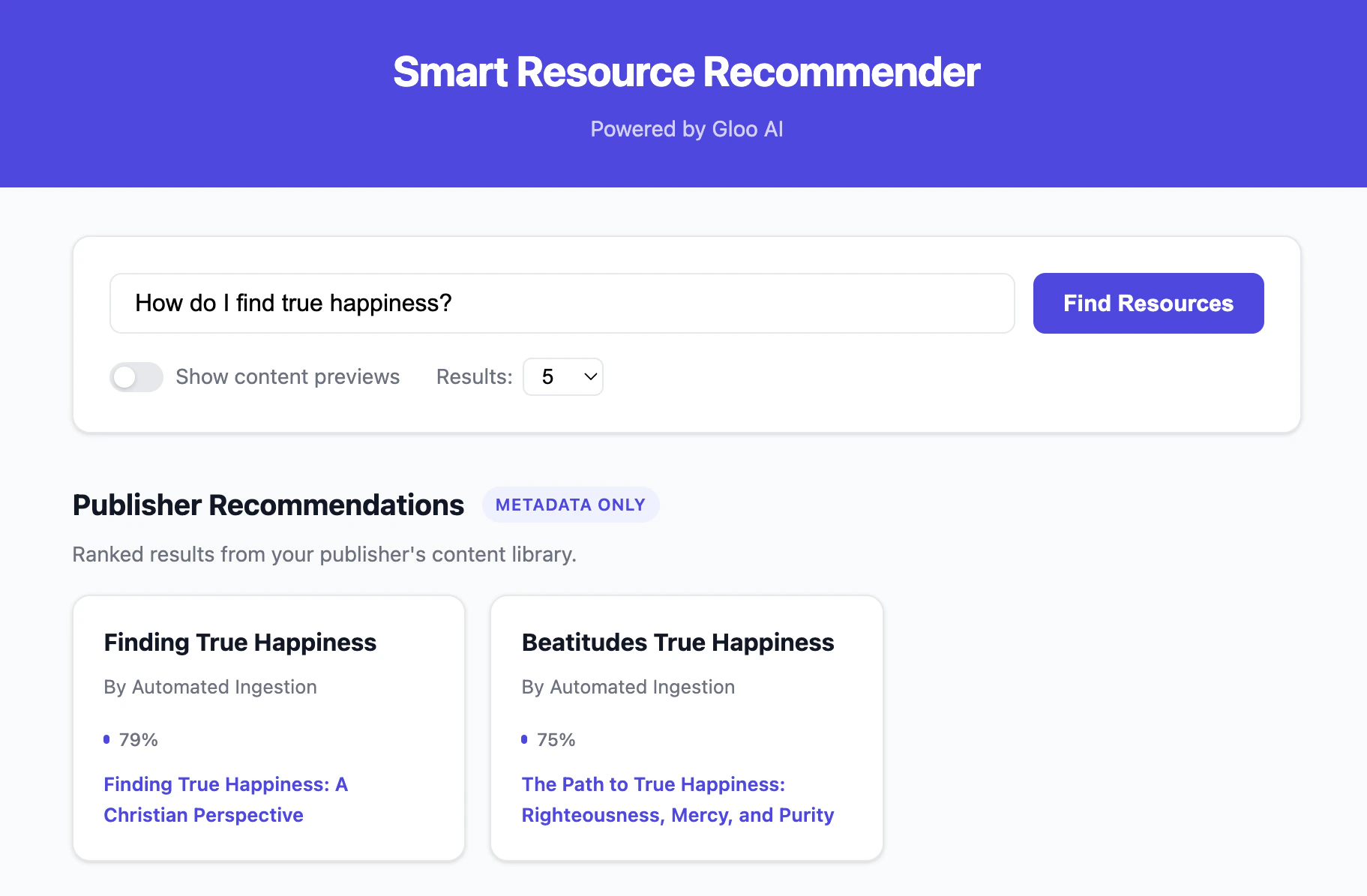
Affiliate Network Discovery
The Explore More panel fires automatically alongside your publisher results, surfacing related content from across the Gloo network: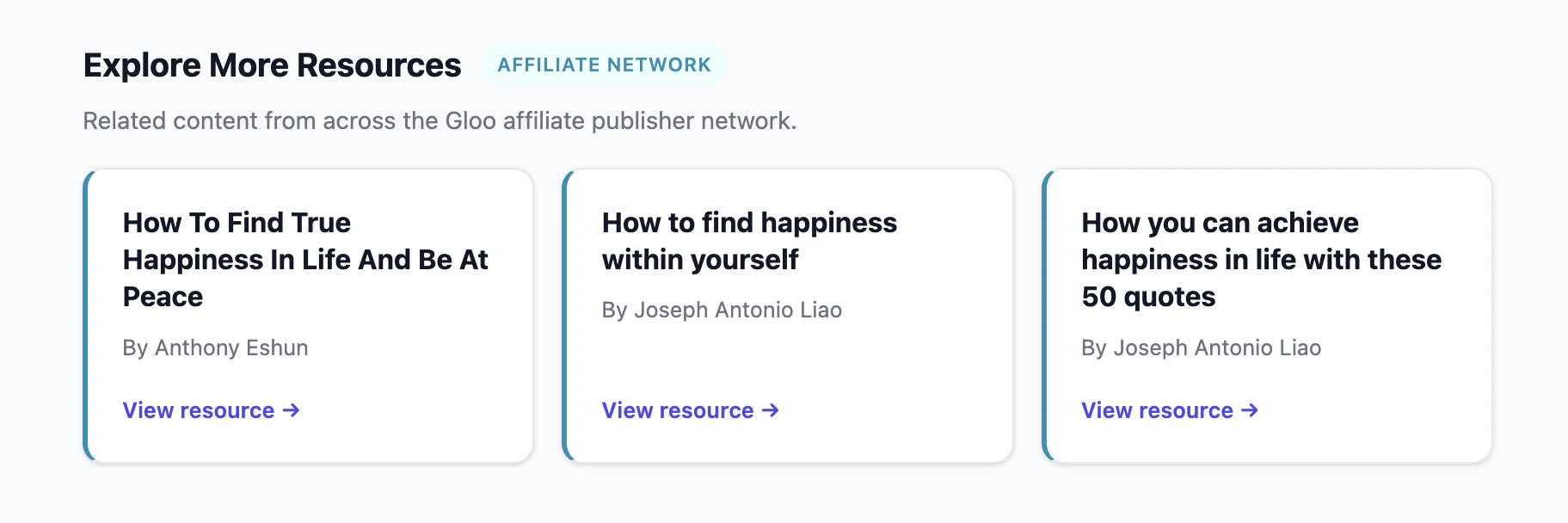
The frontend is language-agnostic — the same HTML/JS works with any language’s
proxy server. This is one approach; customize for your branding and framework.
Complete Working Examples
View Complete Code
Clone or browse the complete working examples for all 6 languages (JavaScript,
TypeScript, Python, PHP, Go, Java) with setup instructions, proxy servers, and
a browser-based frontend.
What’s Included
Each language implementation provides:auth— Shared API key configurationconfig— Centralized configuration (URLs, env vars)recommend_base— Publisher recommendations CLI (metadata only)recommend_verbose— Publisher recommendations CLI (with snippet text)recommend_affiliates— Affiliate network discovery CLIserver— Proxy server exposing REST endpoints for the frontend
Troubleshooting
No Results Returned
certainty_thresholdtoo strict: The default0.75filters out lower-confidence matches. Lower it to0.5to broaden results.- Content not indexed: Test the same query in the Search Playground. If content appears there, your API parameters are correct.
- Wrong tenant: Results are scoped to your publisher. Verify the tenant name matches your publisher in Organizations.
403 Forbidden
- You can only access your own publisher’s content via the publisher endpoints.
- Verify your API key is correct and has not been revoked.
- The affiliate endpoint has broader access — a 403 there indicates an API key issue.
Affiliate Endpoint Returns Empty
- Not all content is available in the affiliate network. Publishers must opt in.
- Try a broader or different query to confirm the endpoint is working.
Authentication Errors
- If your API key is rejected, verify it is correct and has not been revoked (see Authentication Tutorial).
- Ensure you’re using
Bearer {api_key}in the Authorization header.
Next Steps
Base Recommendations API Reference
Endpoint docs for recommendation results that return item metadata only.
Verbose Recommendations API Reference
Endpoint docs for recommendation results that include snippet previews.
Affiliate Referenced Items API Reference
Explore cross-publisher affiliate discovery for related content.
Upload Files
Add more content to your Data Engine for richer recommendations.