

/knowledge/health) when content is missing from search, a source stops synchronizing, or an embedding change needs attention. Read access requires knowledge:read; repair actions require knowledge:manage and remain subject to the affected resource’s access boundary.
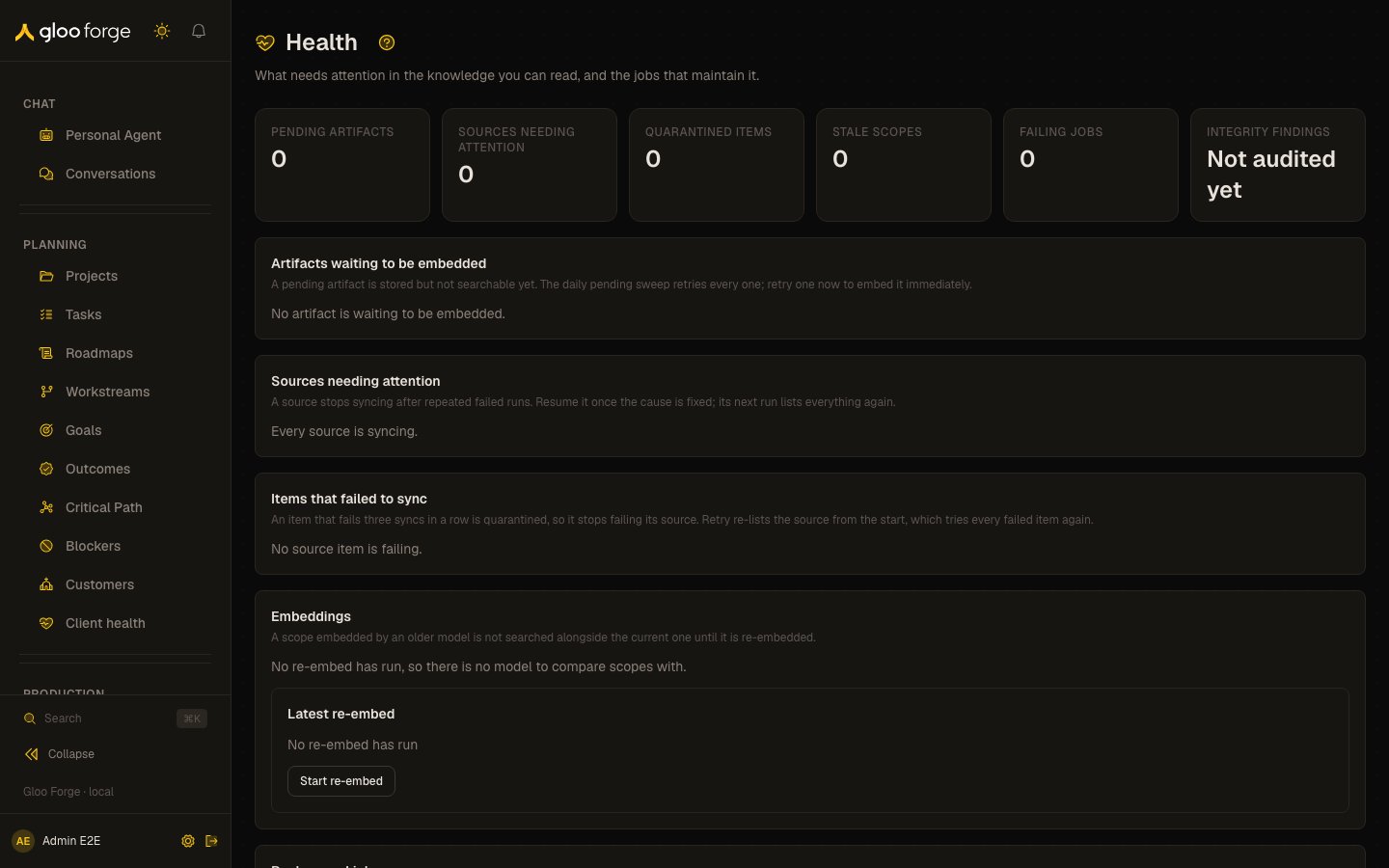
Knowledge health — Forge Console at /knowledge/health
What you can do
- Find the stage where knowledge stopped moving, and act on it once. See Start with the failed stage.
- Retry pending artifacts, resume or sync failing sources, and relist quarantined items. See Health cards.
- Start a re-embed and follow it to its end. See Re-embed.
Start with the failed stage
- Confirm the current scope and any Customer filter.
- Inspect the summary count, then the corresponding card below it.
- Read the item’s age and last error before retrying. Fix a failed credential or unavailable provider first.
- Use the card’s recovery action once and observe whether the item advances or clears.
- Check Review and Sources when the issue concerns approval or external content rather than embeddings.
Health cards
Health (/knowledge/health) answers “what is broken in the knowledge I can read, and how do I
fix it?” without the admin-only Platform › Schedules page. Viewing requires knowledge:read; Retry,
Retry items, Resume, Sync now and Start re-embed require knowledge:manage. Six
counts head the page: pending artifacts, sources needing attention, quarantined items, stale scopes,
failing jobs, and the integrity audit’s findings in its last run. The page names every scope
(“Team: Finance”, “Personal: Ada Lovelace”, “Agent: Triage”) and every artifact by its title, never by
a namespace key or an id.
For one Customer, open /knowledge/health?namespace=customer:<Forge Customer ID>.
Health includes that Customer’s artifacts only when you can read its active Organization
home. The default Health view does not enumerate every Customer. Retrying a pending Customer artifact
checks that artifact’s own Customer scope before scheduling it.
- Artifacts waiting to be embedded. Active artifacts still marked pending in the scopes and source access you can read, oldest first, each with its scope. A pending artifact is stored but not returned by search. An artifact with no title shows a key its author chose, or “Untitled artifact”; a digest key the system made is never shown. The page reads at most 200, up to 50 per scope, and shows the oldest 25 of those; past that bound it says the count is a lower bound and that older artifacts may exist. Retry embeds one now; the daily pending sweep retries them all. If a retry and the sweep embed the same artifact at once, the second embedding is discarded.
- Sources needing attention. Sources stopped at Error or paused, however old (up to 25 per scope and state), and the failing active sources among each scope’s newest 25, with their failed runs in a row and last error. When the page could not read every source, the card says one may be missing, and that Sources lists only the newest 100, so an older one may be missing there too. Resume sets a stopped or paused source active again, and Sync now runs a failing one at once. A source being removed is not listed.
- Items that failed to sync. The items your readable sync sources failed to sync, by source and newest failure first among those read: each item numbered within its source (its case key is a digest, so it is not shown), syncs failed in a row, and the redacted last error. An item that fails three in a row is Quarantined: it stops failing its source’s runs, and it is tried again only when the source lists from the start. Retry items makes the source do that on its next run, scheduled now or after a run already in flight; a paused or stopped source must be resumed instead. At most 500 failures are read and 50 shown, and past that the newest may not be among them.
- Embeddings. Each scope you can read whose vectors are not on the newest re-embed run’s model, the artifacts that run could not re-embed (only in scopes you can read, by title and scope), and the re-embed card. Before the first re-embed run there is no model to compare with, and nothing is marked stale.
- Background jobs. The integrity audit’s lap: laps completed, artifacts checked this lap, findings in its last run and when it last checked. It flags an artifact whose vectors are missing or sit in another scope, and orphaned vectors no artifact names; it repairs nothing. Then each knowledge job’s newest run and newest failure: the pending-artifact embed sweep, source sync dispatch, the integrity audit, the artifact curator and artifact distillation. These are deployment-wide, and a run’s error text stays on Platform › Schedules.
Re-embed
The Latest re-embed card reports the newest run’s state, trigger, start and finish times, progress, current scope, and errors. Before the first run it says No re-embed has run. With management authority, choose Start re-embed and read its confirmation. Only one run proceeds at a time, so the action is disabled while a run is running. Changing the embeddings model can leave a scope unavailable to search until its vectors have been re-embedded and promoted. Plan the change with that interruption in mind. Follow the run to its terminal state and inspect skipped or failed artifacts. A completed run is not evidence that every artifact succeeded. Recheck a representative search and use Search quality to measure retrieval after the change.Common diagnoses
A missing repair control usually reflects read-only access. An empty Health view describes only the knowledge your session can read.
Key state to watch
- Pending artifacts — stored but not returned by search until they are embedded.
- Quarantined — an item that failed to sync three times in a row.
- Stale scopes — vectors not on the newest re-embed run’s model.
- A lower-bound count — the view reached its read limit; it is not the total.
Related surfaces
- Search quality: check retrieval results after a repair or re-embed.
- Review knowledge: steward work: approvals, conflicts, duplicates, stale and contested cases.
- Sources: fix a source whose synchronization is failing.
- Settings: change the embeddings model that a re-embed follows.